
The June Refresh takes agentic development to the next level
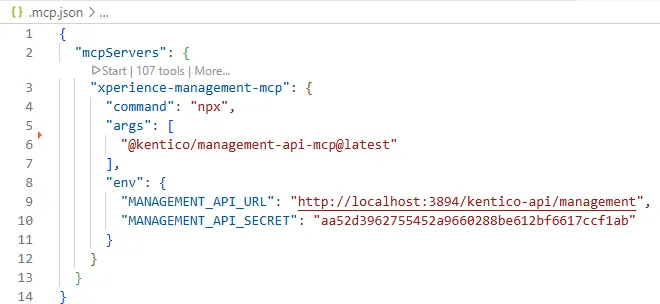
With the Xperience by Kentico June 2026 Refresh, we significantly expanded the Management MCP Server. It now provides 107 tools that allow AI agents to interact with the Xperience by Kentico administration through the Management API.
The goal is simple: instead of manually switching between your IDE and the administration, let your AI agent perform repetitive administrative tasks while you stay focused on development.
Important
The Management MCP Server is currently intended for local development only. It does not yet provide the level of security required for staging or production environments, so we do not recommend deploying it outside your local development environment.
Getting started
You can follow our documentation to install the Management MCP Server (part of KentiCopilot), but if you're already using an AI coding agent, it's even easier to let the agent do the work for you.
A prompt like this is often enough:
- Install the Xperience by Kentico Management MCP Server into my implementation.
- Verify that it's working, and tell me how many MCP tools are available.
The agent can install the server, verify the configuration, and confirm that all available tools are accessible.
Once that's done, you're ready to try your first practical scenario.
Automatically generate a living widget catalog
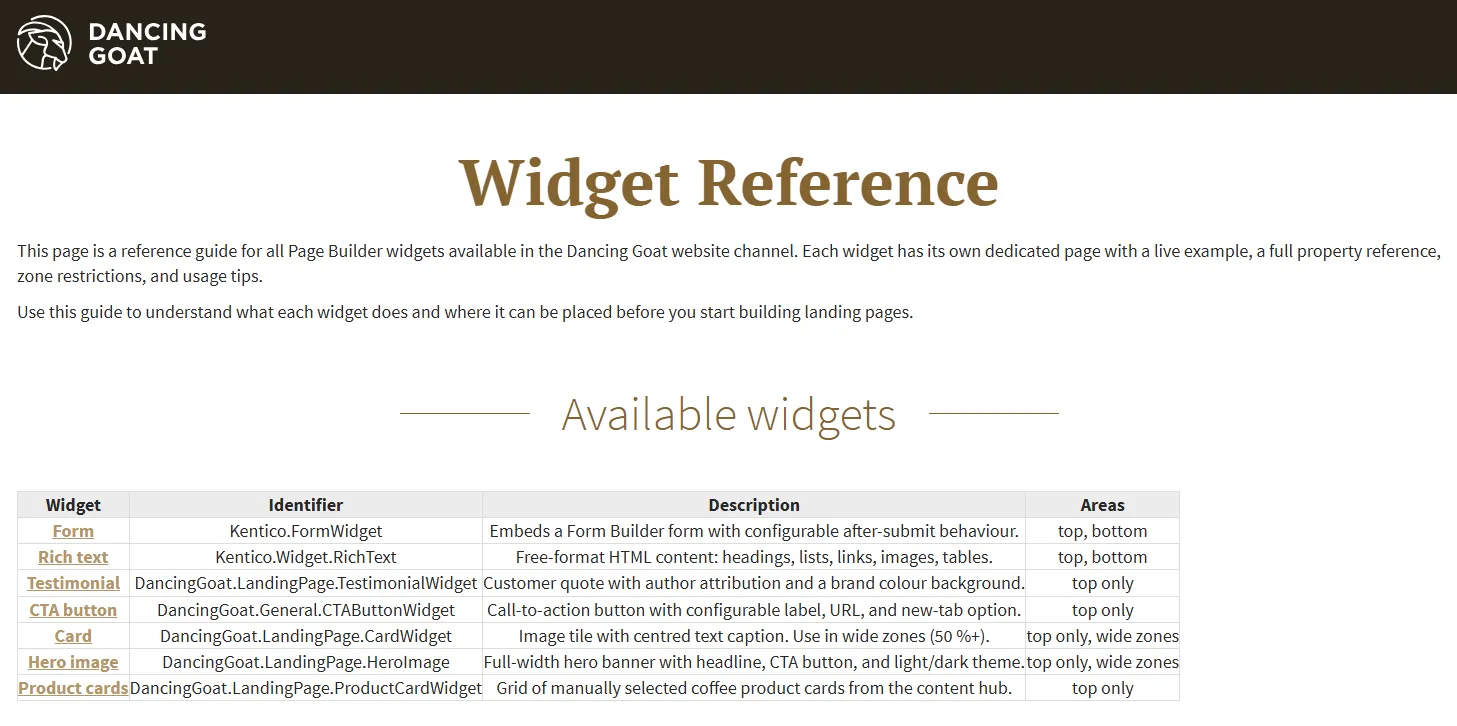
Years ago, when I worked as a developer at a digital agency, our QA engineers and customers' content editors and marketers relied on documentation that described every widget in the project. They needed a simple way to see what each widget looked like, understand its configuration options, and verify that it behaved correctly.
Today, the Management MCP Server can automate almost the entire process.
Ask your AI agent to:
Inspect your Xperience by Kentico implementation.
Discover every registered widget.
Create a
/widgetssection in the page tree.Generate one page for each widget.
Place the widget on the page using a basic configuration so it can be rendered.
Generate documentation describing the widget and its configurable properties.
Create an index page listing all widgets with links to their individual pages.
A prompt similar to this works well:
- Inspect my Xperience by Kentico solution and find all registered widgets.
- Create a new /widgets section.
- Generate one page for every widget
  - Render the widget using a basic configuration
  - Document all configurable properties with a short description
  - Create an index page that links to every widget page.
Before vs. today
Not long ago, creating and maintaining a widget catalog like this required a significant amount of manual work. Someone had to create the pages, place every widget, configure it so it rendered correctly, and keep the documentation up to date as the project evolved.
Because of that effort, many projects simply never had one.
Today, the Management MCP Server can create pages, modify the Page Builder content, and place widgets automatically. What used to take hours of manual work can now be completed in just a few minutes by an AI agent.
At this point, having a living widget catalog is almost a no-brainer, and I'd recommend it for every Xperience by Kentico implementation.
While QA engineers are obvious beneficiaries, they're far from the only audience. Content editors and marketers can also use the catalog to quickly explore the available widgets, understand their purpose, and see how they look when configured correctly—all without needing to inspect the implementation itself.

David Slavik
I'm a Product Strategist at Kentico and part of the Product team working on Xperience by Kentico. My role is to help bridge the gap between our customers, partners, and our product teams, ensuring that customer feedback is reflected in our product strategy, roadmap, and priorities. My goal is to help shape a product that solves real-world challenges and delivers the best possible experience for developers, marketers, and content editors.
I've been working with Kentico products since 2010. I started my journey as a Kentico developer and later held various technical and consulting roles at digital agencies delivering Kentico solutions. This hands-on experience gives me a deep understanding of the challenges our customers face every day and helps me represent their perspective when shaping the future of Xperience by Kentico.