Let's explore a real-world, in-production AI assisted software development example using Xperience by Kentico’s Management API (via the MCP server) together with KentiCopilot’s agentic AI prompts to author a new content type and generate a Page Builder widget - both of which are now live on the Kentico Community Portal.

Check out this month's update to Xperience by Kentico. We improved several core capabilities across the product, including the Form Builder, SaaS observability, AIRA content transformation, digital commerce discounts, and support for orders and customers in the Kentico Migration Tool.
Improving customer experience with form visibility conditions
Marketers use many signals to identify customer engagement and interest, but few are as direct as a form submission. Forms let customers submit their requests or feedback to marketing teams, often as a request for follow up information or meetings.
Because forms are a simple and effective engagement tool (especially for customers deep in the marketing funnel at the "decision" phase) they become a key part of the customer experience on a website.
Displaying irrelevant fields in a form can make it more difficult for customers to understand which fields are required for their submission, leading to unoptimized UX and potential form abandonment - a real loss for nurtured leads.
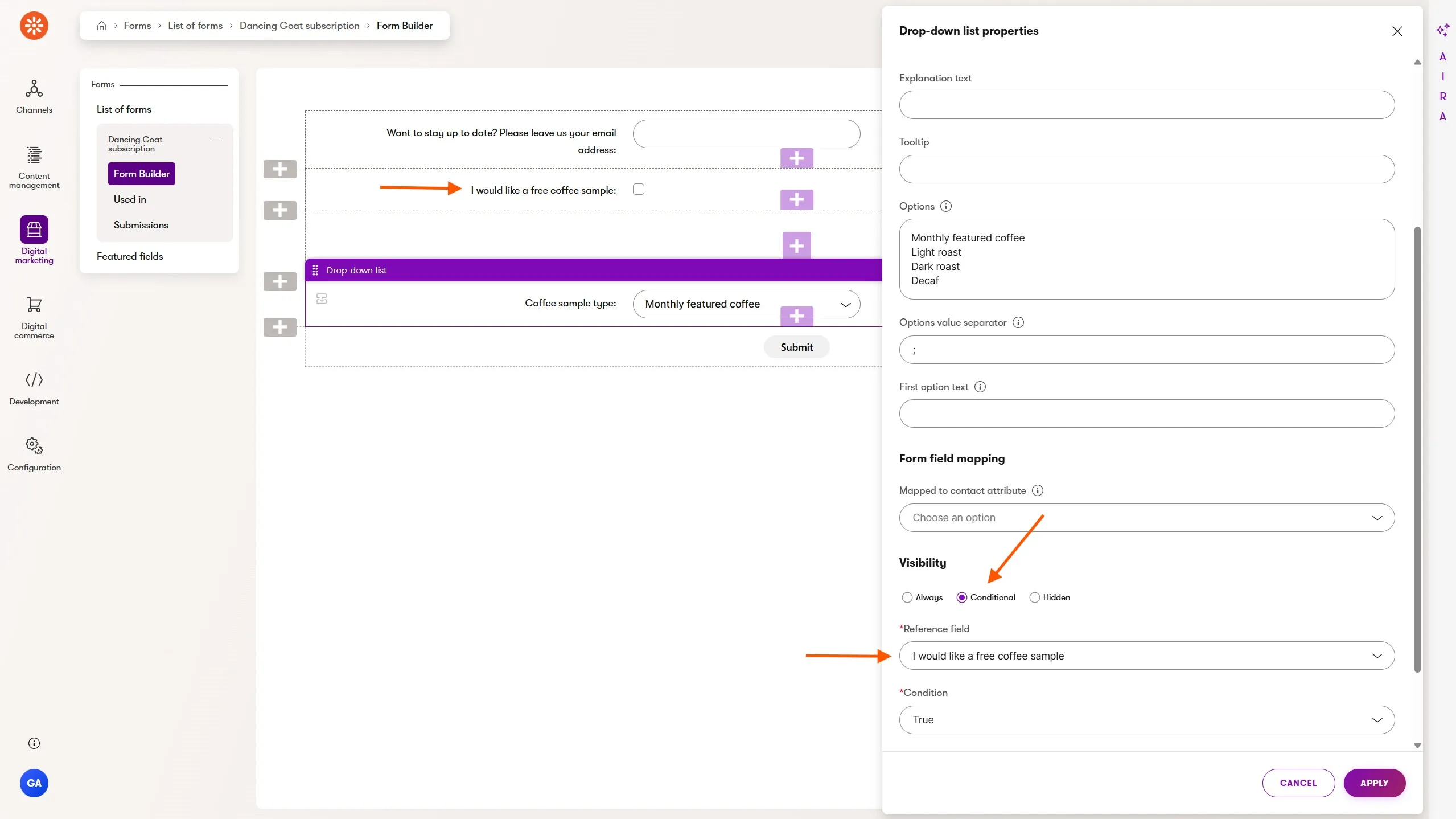
Xperience by Kentico's January Refresh brings form field visibility conditions, giving marketers the ability to dynamically display form fields under predefined conditions, configured within Xperience's Form Builder UI.
In the screenshot above, the Dancing Goat marketing team has set up a newsletter sign up form which gives visitors the option to request a free coffee sample with their sign up and confirmation.
The Coffee sample type field will only be displayed when the I would like a free coffee sample field has a value of true. No web development knowledge is required to set this up - just point, click, and configure!
When the customer visits the website, they will see the Coffee sample type form field dynamically displayed given the conditions specified by the marketer.
Not only can marketers add conditionally visible fields, they can also add hidden fields, which are not included in the form on the website but are available for programmatic data collection.
For example, imagine a scenario where a geographic region field, selected by a customer, determines the salesperson assigned to the lead when the submission is synced to a CRM or could even drive a custom built email sent to the salesperson directly from Xperience.
Form field visibility conditions can be combined with built-in or custom field validation rules, which we also recently added to Xperience. This combination increases conversions while also improving the quality of the information submitted by customers in these forms.
AI content transformation everywhere with AIRA rich text refinements
Many marketers are adopting AI technology into their content creation workflows - they jump between multiple editors and tools, making sure they keep track of the latest version between all their copy and pastes.
Xperience by Kentico ensures marketers have access to AI tools at their fingertips where they do their final content review and publishing, thanks to AIRA's quick text transformation capabilities.
Previously these were limited to email content fields, but we've now added this to all rich text editors across the product, whether a marketer is in structured content in the Content hub or inline rich text widgets in the website channel Page Builder.
Highlight any rich text in Xperience and the AIRA rich text refinement context menu will be available with 1-click options or the ability to give a fully custom prompt to AIRA to tailor the message to your needs.
Stay tuned for our next AIRA content writing update planned for February's Refresh which will bring some UX improvements and full text-generation capabilities!
Simpler store promotions with digital commerce generic coupons
Marketers responsible for driving sales in digital commerce experiences have a large number of tools to get the most relevant products in front of customers. Cross-selling and upselling are common tools that increase customer education and awareness of product offerings.
Another set of tools are promotions and discounts, which work to lower the buying friction for the customer, incentivizing them to complete their transaction.
Xperience by Kentico added support for discounts and promotions in December 2025's Refresh and this month we've enhanced them with generic coupons.
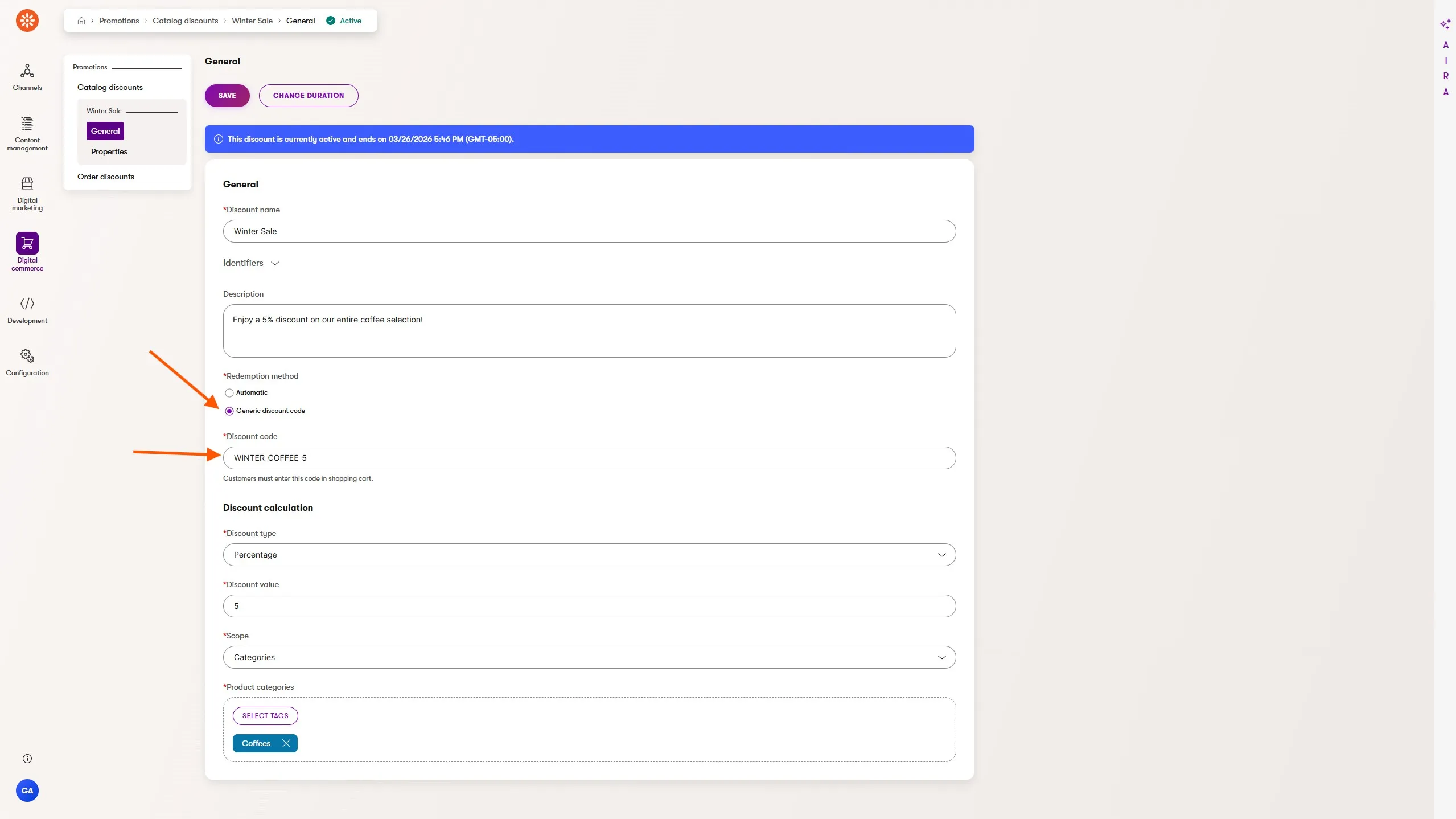
Previously, promotions were applied automatically to shopping carts when the promotion rules were satisfied based on validity dates, product categories, or other eligibility rules configured by marketers.
With coupon codes, marketers can use gated or targeted coupon codes to further incentivize or limit discounts for customers.
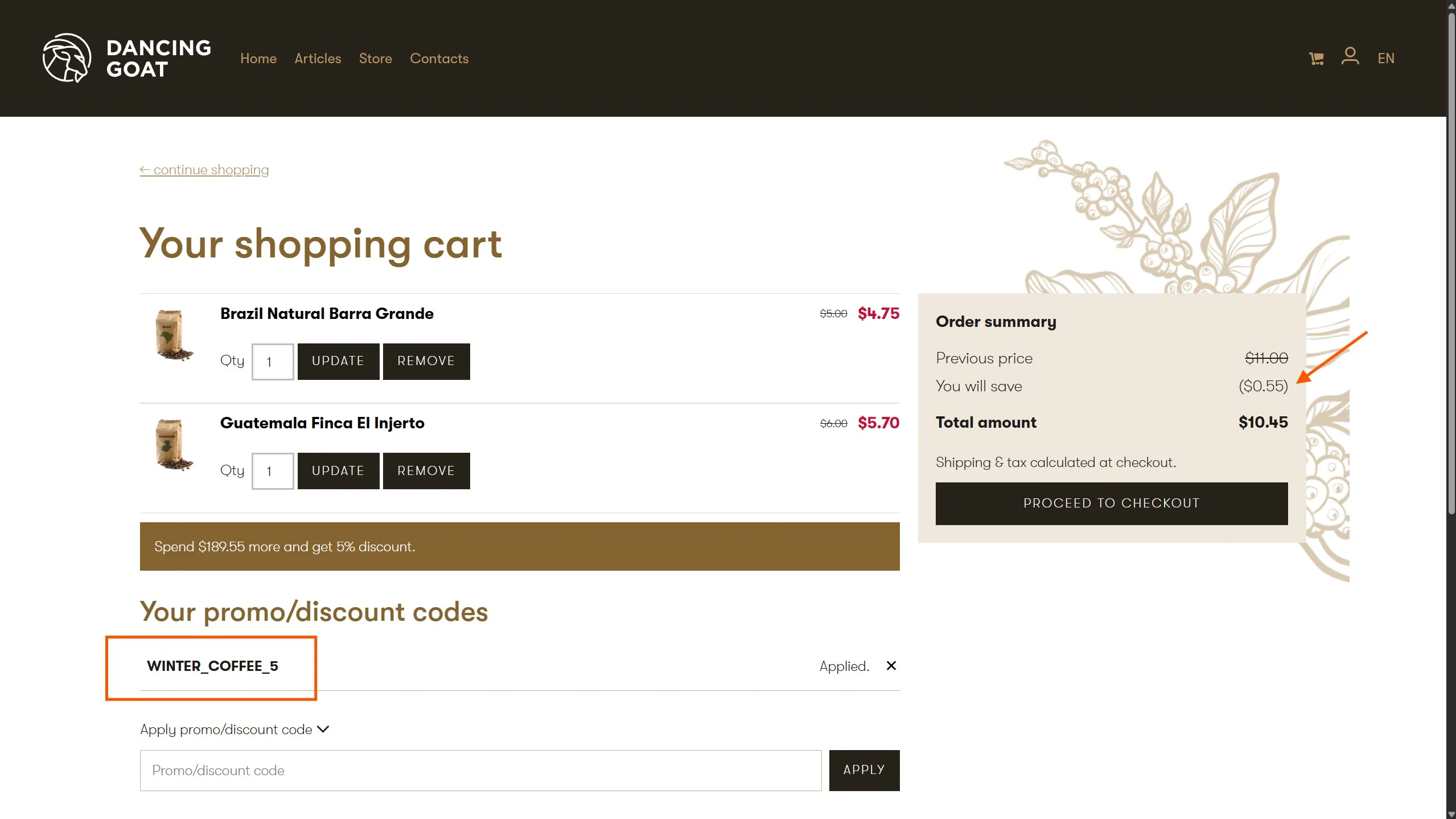
Using marketing emails, members-only web portals, or in-person events, marketers can share these coupon codes with specific customers, discounting specific products or entire product categories, incentivizing a relevant next purchase.
More targeted automations with value-based activity signals
Marketers use automations to scale their ability to react to customer activities. Automations include triggers, conditions, and actions which model the decision making and workflows marketers would carry out if they handled the activities manually.
Xperience by Kentico's automations include a selection of each of these configuration points, enabling a wide variety of ways to react to customer engagement across web and email channels.
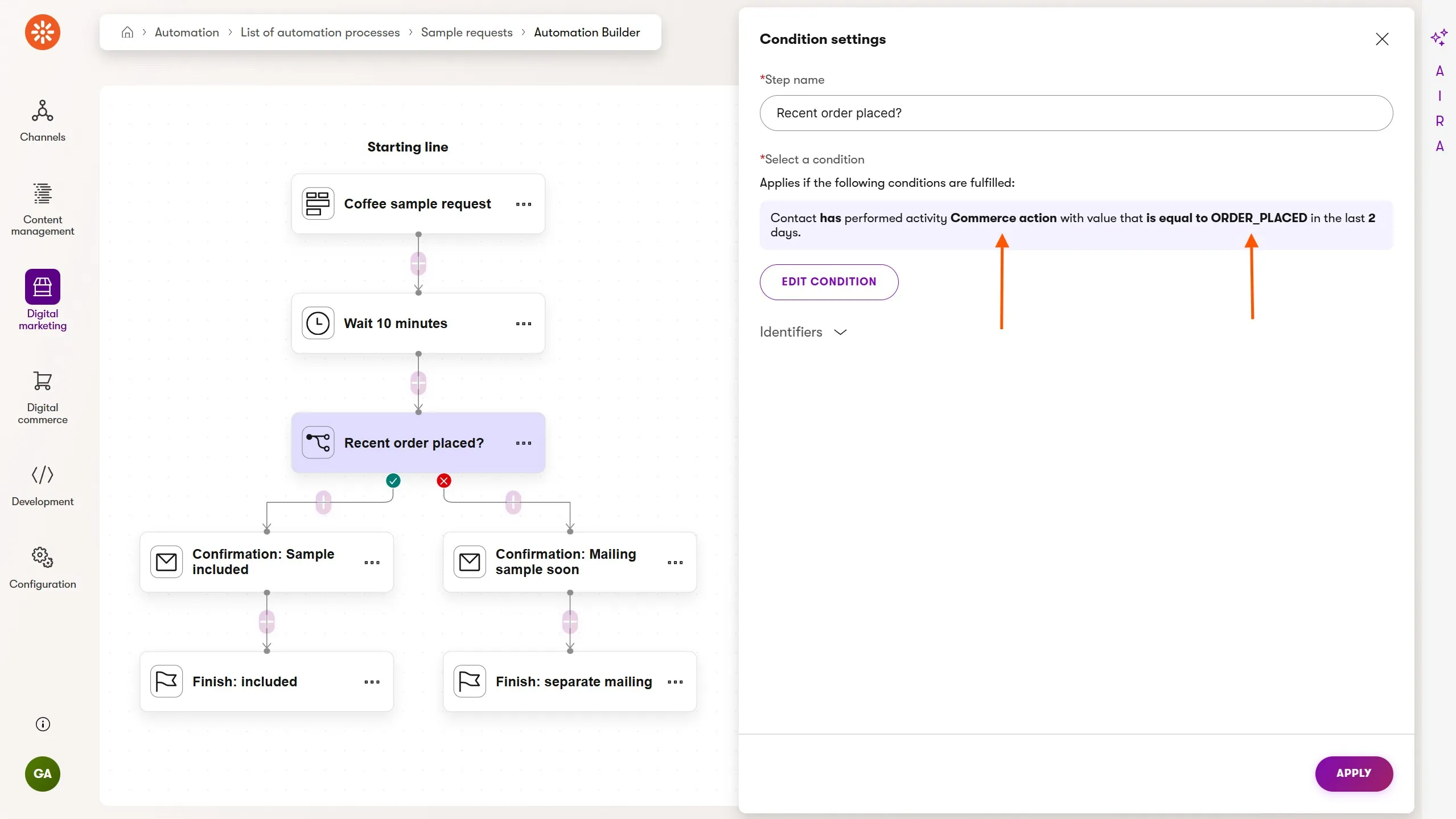
January's Refresh enhances Xperience's automation conditions. Marketers can now send customers down an automation path based not only on the occurrence of an activity, but also that activity's value. Additionally, this includes the activity types Xperience ships with and any custom activities defined for your implementation.
In the screenshot above, a marketer has defined an automation to send a different confirmation email to a customer when they request a coffee sample. When the customer has recently completed an order through a commerce experience the confirmation will let them know the sample is being shipped with their order.
The Commerce action activity and ORDER_PLACED value are both custom and can be instrumented through Xperience's activity tracking capability for commerce or any other solution type.
Increased edge observability with SaaS Cloudflare security insights
Xperience by Kentico SaaS simplifies multi-environment security and observability (along with compliance, hosting, infrastructure, backups, and deployment) for Xperience by Kentico customers. Most CIOs will tell you these items are all non-negotiables.
Observability is handled through the Xperience Portal's performance metrics and event logs, available for both pre-production and production environments.
Security is covered in part through our compliance certifications, which guarantee secure processes limiting environment access, and our use of Cloudflare as a web application firewall (WAF) sitting in front of every customer's SaaS environment.
Of course, there's an overlap where observability meets security and to that end we've introduced security event monitoring in the Xperience Portal.
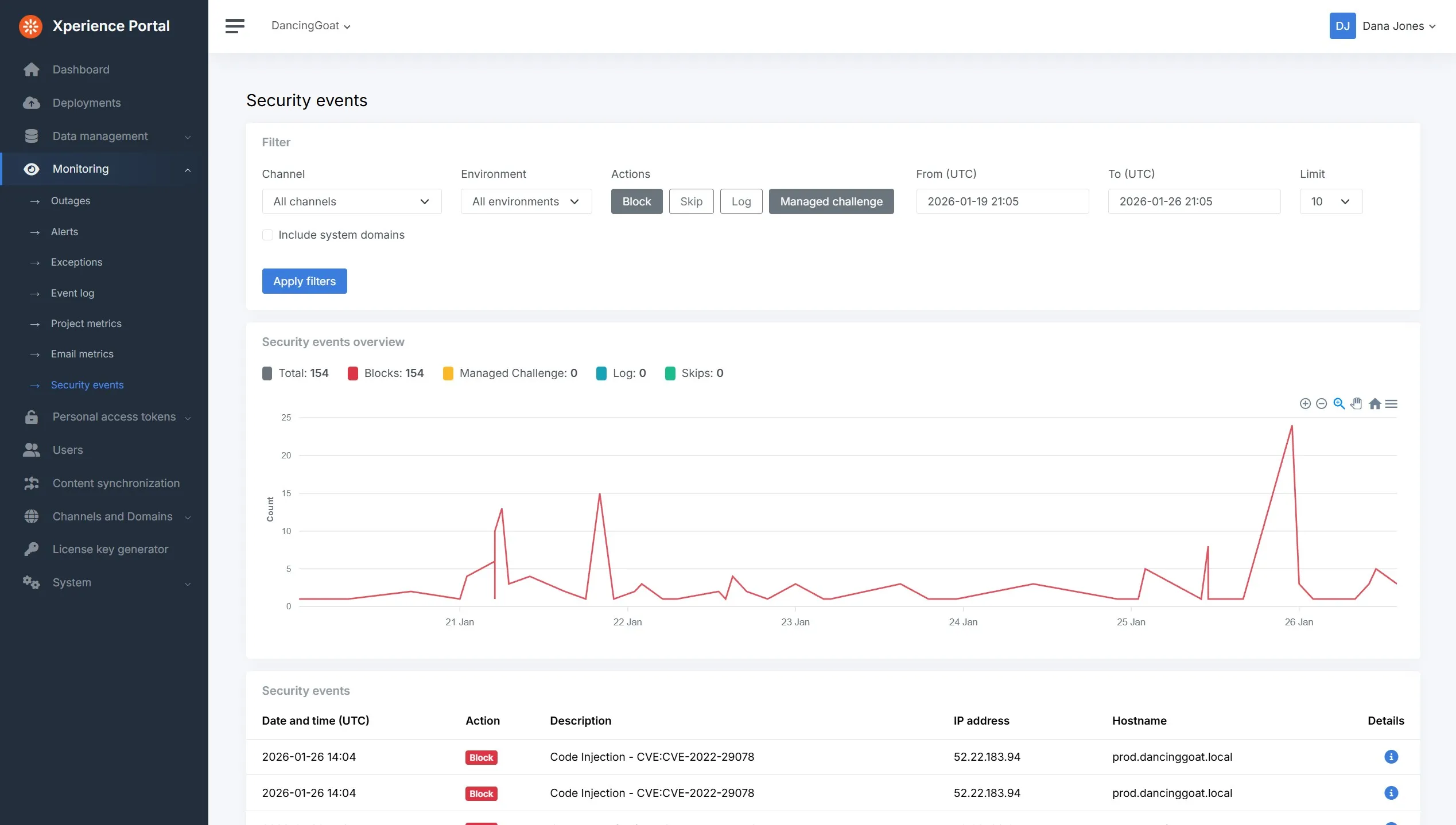
The security events exposed through the Xperience Portal can be used to look for trends in attacks that Cloudflare blocks or troubleshoot specific flagged requests using Cloudflare's request-unique Ray ID.
The reporting covers all website channels and environments for the previous 28 days, giving operations professionals and stakeholders the insights they need to understand Cloudflare's robust protection.
Faster upgrades with new Migration Toolkit commerce support, guides, and tools
We know our customers and partner agencies are eager to upgrade to Xperience by Kentico, which is why we've invested heavily in the Kentico Migration Tool (part of the Xperience by Kentico Migration Toolkit). Each Xperience by Kentico Refresh introduces new product capabilities and expands upgrade pathways for our customers.
Migrating commerce data
Every digital commerce feature added to Xperience over the past year has been a positive signal that we are prepped for commerce solutions. To fully pave that upgrade pathway we recently added commerce data migration support to the Kentico Migration Tool, which now supports migrating commerce entities (customers, orders) from Kentico Xperience 13.
The details are covered in the repository documentation. Migrating products has always been supported by the Kentico Migration Tool because in Xperience by Kentico products are just structured content - reusable content items or web pages.
Extending the Kentico Migration Tool to match the content and data transformation needs of your project is expected and supported, so we've thoroughly restructured and improved the Migration Tool Customization documentation to help developers:
Understand how the tool works
Understand what's possible in a data migration
Provide AI agents with the context they need to assist in upgrade planning and execution
In this video above the following prompt is given to an AI agent in VS Code:
What kinds of advanced content modeling approaches can I take during my Kentico Xperience 13 content migration to Xperience by Kentico?
What APIs should I be familiar with to customize my migration?
The agent quickly reviews the updated customization documentation for the Kentico Migration Tool and returns a brief summary of its capabilities. This can help developers get onboarded to the technical aspects of migrations much more quickly.
Following along with the video above, once the agent and the developer have the context of what's capable they can begin exploring content transformation options for the current upgrade to Xperience by Kentico:
How can I migrate a web page article to a web page in Xperience by Kentico but extract its attachment as a reusable content item in the Content hub?
Faster upgrades with agentic AI code migration support
In last month's Refresh we showed how developers can use AI agents and prompting tools in our KentiCopilot GitHub repository to quickly build production-ready Page Builder widgets.
This approach was also covered in a recent blog post:
Adding to our support for upgrades, developers can now try code migration support through KentiCopilot, covering AI assisted code upgrades from Kentico Xperience 13 to Xperience by Kentico.
That's right! Not only can AI agents help you migrate and transform your Kentico Xperience 13 content and data, but they can assist in the code preparation and translation as well.
Developers will use our documentation MCP server and the Playwright MCP server to give their agent access to the existing Kentico Xperience 13 website.
We support Claude Code, Cursor, and GitHub Copilot with a set fully customizable AI instructions and prompts.
We're excited for developers to try out these KentiCopilot resources and share their experiences with us.
Updated guides for upgrades
We received feedback that it could be difficult to discover all of the great material about upgrades to Xperience by Kentico in our Learn Portal Guides.
Thanks to that feedback we've made several structural changes to simplify organization and added some new content.
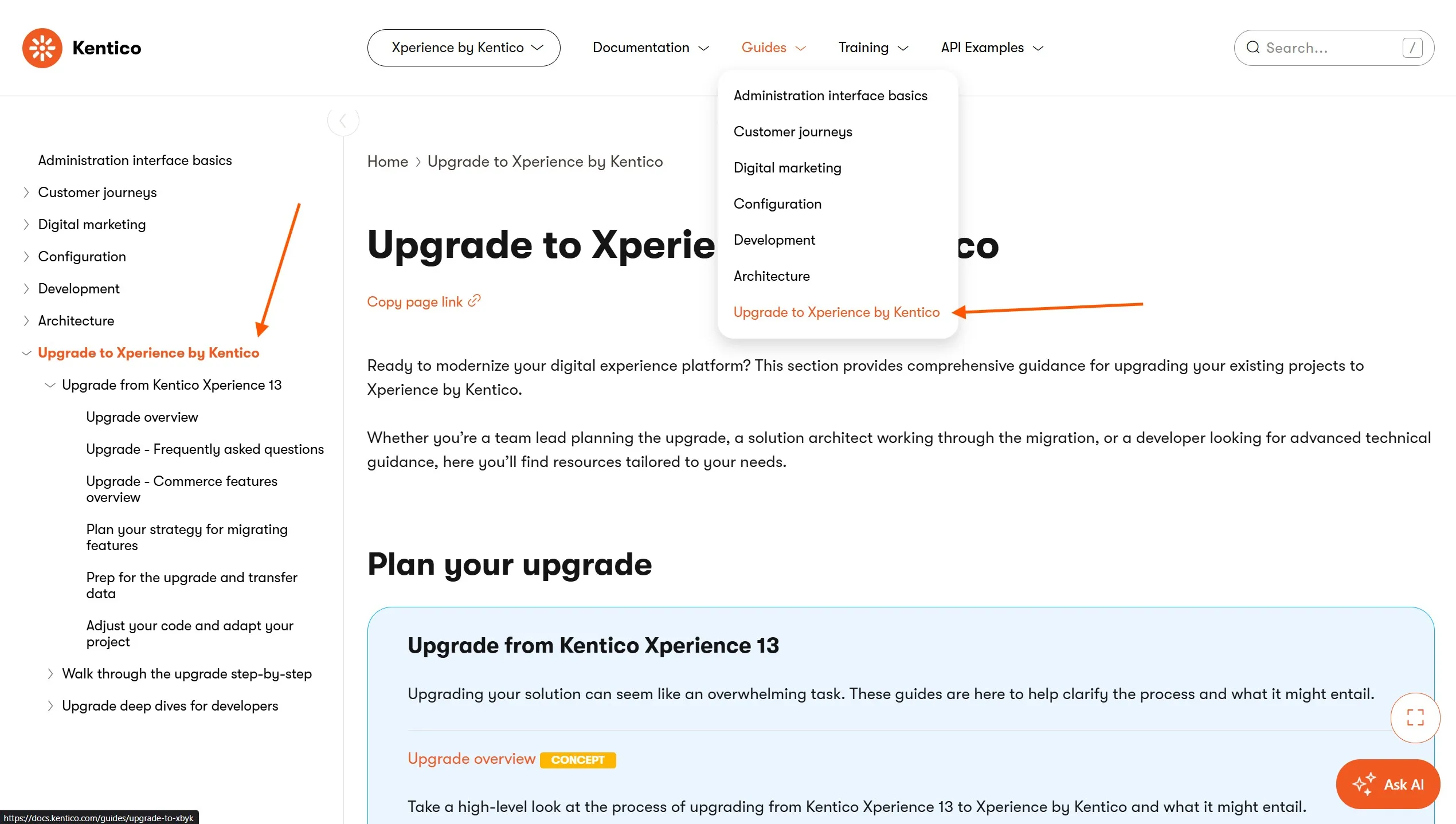
Upgrade to Xperience by Kentico is top level page in our Guides and all upgrade related information can be found underneath it in the side navigation, as shown in the screenshot above.
For commerce solutions we also have an Upgrade - Commerce features overview page that gives a feature-by-feature comparison between Kentico Xperience 13 and Xperience by Kentico, including recommended architectural approaches and how Xperience by Kentico can be extended to meet your specific needs.
This is a fantastic resource for teams planning a commerce upgrade, so be sure to review it if you are involved in one.
What's next?
As always, check out our documentation Changelog for the full Refresh feature and technical details.
We hope these new capabilities, features, and API improvements unlock solutions for you. Try them out and let us know 👋 what you think.
What's planned for the next Refresh?
Membership roles, enabling efficient management of gated content by grouping members into roles and setting up access to specific pages or entire sections of your website based on these roles.
Handling cases where the origin server is unreachable, introducing a configurable outage fallback that serves a branded placeholder or last-known-good page from the edge (via CDN) when the origin server is down.
Customer Data Platform I. - Profile detail and Listing, introducing a unified contact profile with identity resolution, merging contacts, members, and customers into a single view with a new Contact Profile application for marketers.
Assisted content writing (text generation), extending AIRA's capabilities to generate new content in any text area field using the context of related fields within the content item, page, or email.
Content Strategist (an AIRA agent), helping marketers identify content gaps, receive strategic recommendations, access editorial guidelines, and maintain content strategy as the business evolves.
These updates will, as always, accompany a number of UX and developer-focused improvements.
Check back soon for the next Xperience by Kentico Refresh review!
For the technical audience, this Refresh is represented by v31.1.0 of Xperience by Kentico.

Kentico Community
The Kentico Community