Content model and customer experience
Enough review of the results, let's look at the implementation process!
Working backwards from design
There are several popular approaches to building an experience that combines content and design in a DXP like Xperience by Kentico.
When building a new website, email series, or mobile app, you typically want to tackle your content modeling first. Designing an experience requires understanding the content it displays.
However, if the content and experience are simple enough, you can go in the other direction - start with the design using example content and generate the content model from that.
Design your content before your UI
Be careful starting your design before you understand your content model.
Although this approach can be fast, it does risk creating content types that don't fit with the rest of your model if you don't already know it well enough.
You will later see how this impacted me as I iterated on the content model.
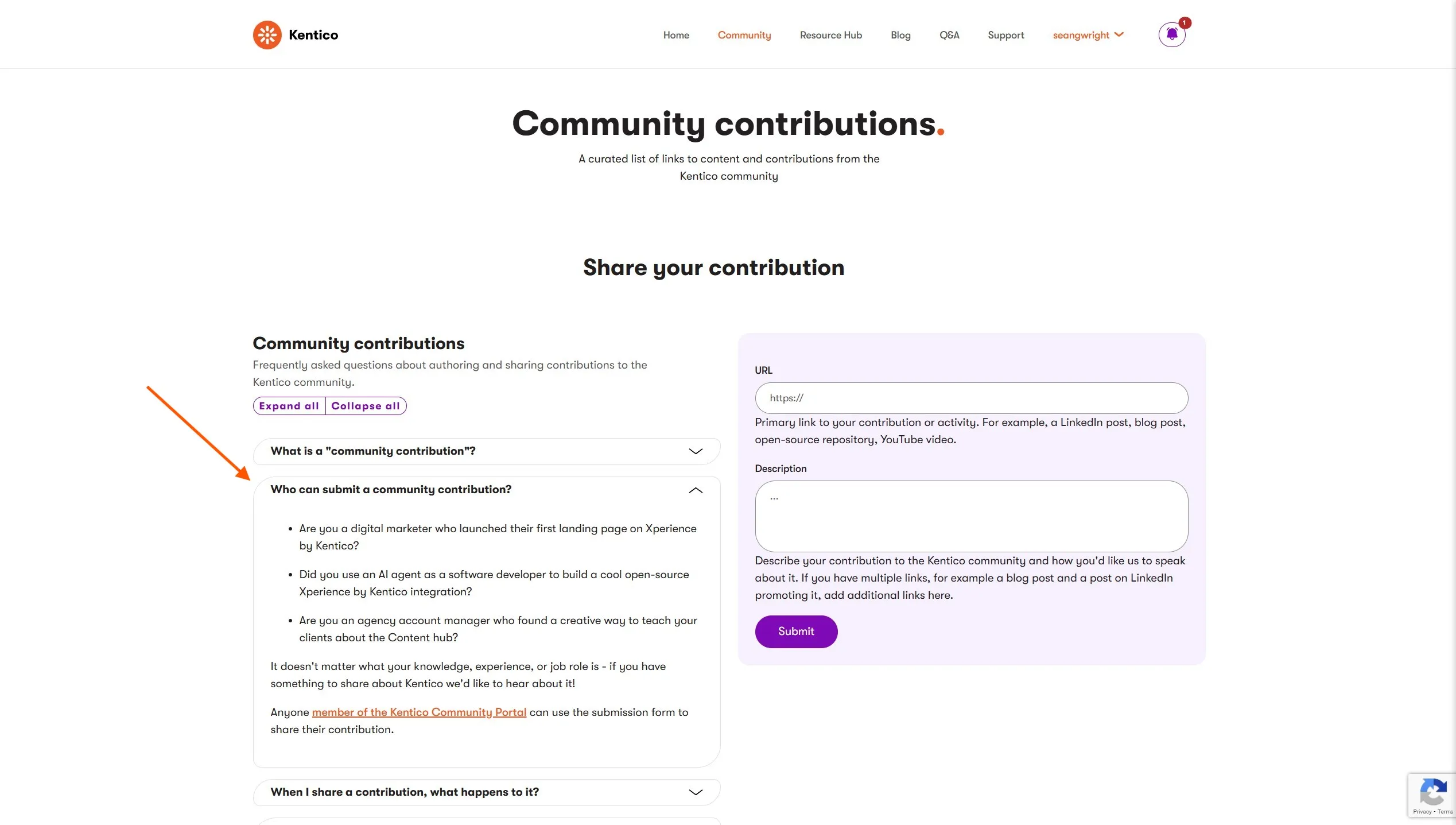
I am not a designer, so I prompted GitHub Copilot in agent mode (using Claude Sonnet 4.5) to create an HTML design of an FAQ experience using Bootstrap.
create snippet of html that shows a collection of "FAQ" components using bootstrap 5.3 accordions
the accordions should be grouped together but opening one should not close the other open one in the group - they are independent
instead, if there is more than 1 accordion in the group, add a nice looking UI element (using bootstrap 5.3 components) that lets me collapse or expand all accordions in the group
I saved this generated template in the Kentico Community Portal repository so you can see what I was working with. I plan to store these scaffolding pieces in the /agent-resources/ folder of the repository going forward.
Crafting a content model from design
When content modeling you start by identifying the goals of your content and common attributes it has, which you abstract out into the content model. In Xperience by Kentico that content model is implemented as content types.
Learn content modeling concepts
Understanding content modeling will help you make good strategic content and architecture decisions.
If these concepts are unfamiliar to you, explore them by following the links above.
If you've never designed content types in Xperience by Kentico, try using our content modeling MCP server to help you choose a content type implementation.
Because I started with design, the next step was to generate the content model. I instructed GitHub Copilot to use Xperience's content management MCP server so I would not need to click around in the administration UI to build the content types by hand.
I started a new chat session and gave my agent the following prompt, referencing the design template.
analyze this design.html mockup FAQ widget component template
create a reusable FAQ content type that fits the data of this widget
the content type should follow the naming conventions of the content types in this project
use the xperience-management-api mcp server to retrieve information about existing content types and create a new one
Throw away context that is no longer relevant
I started my agent chat focused on designing an HTML template, but began a new chat session to design the content type because these are unrelated tasks. If I need the agent to access the output of the previous task (like the design.html file) I can reference it in my new chat.
Including extra context – all the thinking output of the HTML design process - could reduce the quality of my agent-generated content type. This is context engineering.
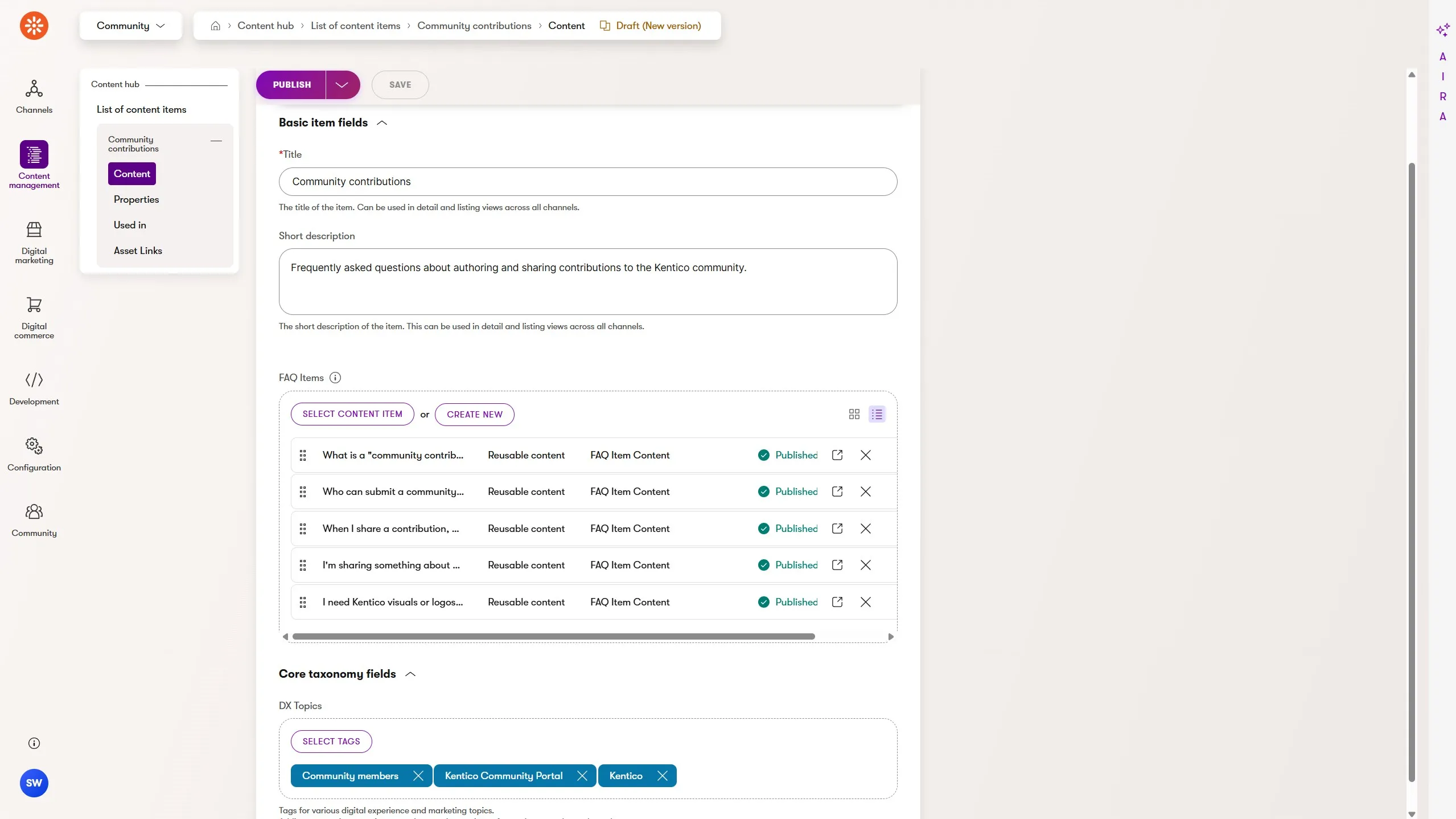
Once the FAQ Item content type was generated I instructed the agent to create the FAQ Group content type:
now create an FAQ "group" reusable content item
This did not take long and once completed, I reviewed the content types in the Xperience administration UI and found my overly simplistic prompt did not produce the results I wanted.
So, I requested some changes:
rename the field FAQGroupContentFAQItems to FAQGroupContentFAQItemContents
Work with the agent, not around it
I could have made this content type edit myself in the administration UI, but that change would have only been visible to me, not the agent.
Yes, I can make the change more quickly by typing the content type field name myself, but this habit can slowly sabotage the benefits of using an agent to work with and for you.
Imagine collaborating on building the content type with a colleague using a shared database.
Each time they make a mistake (possibly because you did not provide enough context when you gave them instructions 😅), you make the change yourself. They do not see you make it!
Any future updates you request could lead to confusion when they see the state of the content type changed without their interaction. They might even revert your change, thinking it was an accidental or incorrect modification!
This is something we should consider when working with AI agents.
My original content type creation prompt wasn't very detailed. I also didn't model the content type in advance - the model was based on the design.
Unsurprisingly, I did not get the result I wanted. Yes, the agent generated the content types quickly but moving quickly in the wrong direction does not get to the destination any faster.
I had the agent iterate on the content model:
All of this could have been specified in my original prompt if I had taken the time to actually model the content.
Previously, this kind of rapid content type design iteration was not possible. It takes too long to click through the UI and then switch to see the content management experience when authoring a content item.
Based on this recent experience, I think Xperience by Kentico's MCP controlled content type authoring works best when you plan the content modeling ahead of time. I also believe this fast iteration enables a brand new kind of content design exploration that could be very powerful in the right situations!
Generate AI agent instructions with KentiCopilot
With the design and content types ready, I generated the content types' C# class code so Copilot could use it to build my widget.
Thanks to KentiCopilot, our set of tools, features, and educational materials we create to help developers work smarter with AI, getting my agent to write the widget code was a simple step-by-step process.
The KentiCopilot GitHub repository includes a folder for each feature and set of tools. I used the GitHub Copilot variant of the widget creation feature, which follows some of the AI assisted software development practices I've detailed in other blog posts, like using custom agent instructions.
Getting the most out of agentic software development with Xperience by Kentico requires managing your agent's context. Learn how to use GitHub Copilot custom instructions to help you manage that context in your Xperience repository.
I copied the KentiCopilot files into the Kentico Community Portal repository and authored a set of simple requirements for the widget:
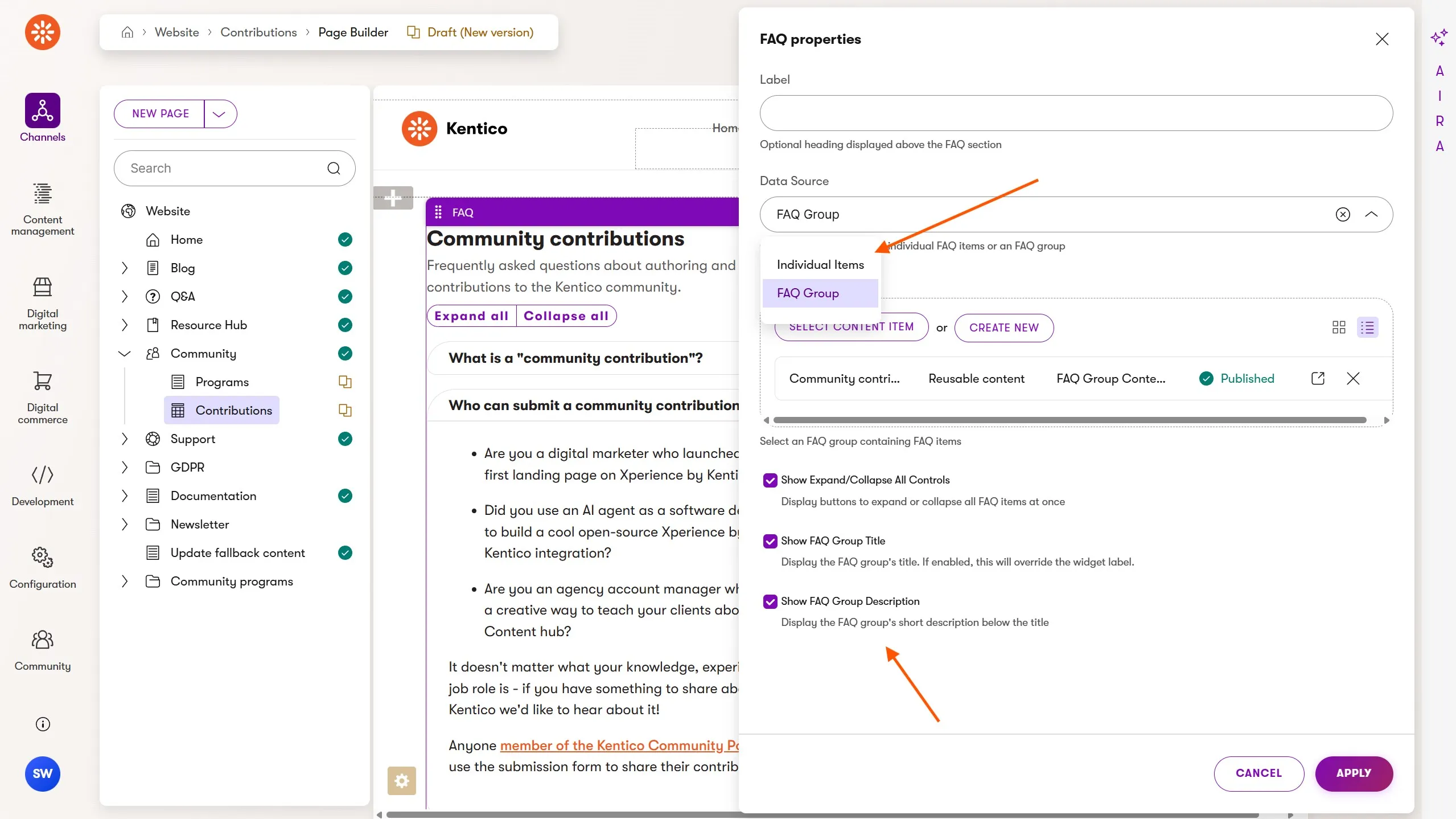
support either 1 or more FAQItemContent content items or 1 FAQGroupContents
- the marketer can select which data source they would prefer to use
expand all / collapse all UI can be displayed or hidden through widget properties
use the design.html template as an example of multiple FAQs being displayed
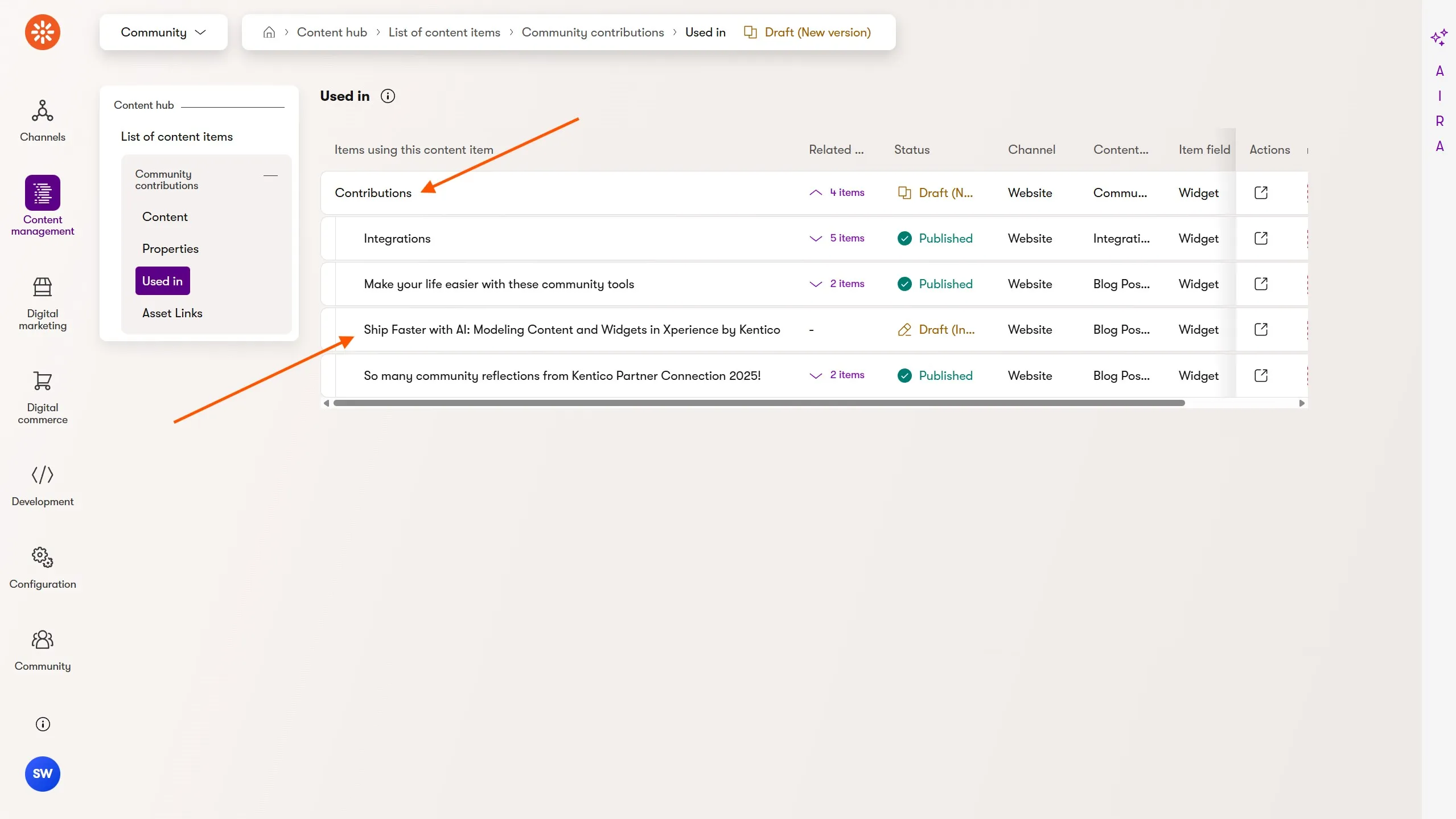
ensure multiple instances of this widget can be placed on the same page
- the HTML IDs / attributes used to hook in the javascript functionality need to be unique for each widget instance (use a content item GUID)
don't use an IIFE for the js - instead use ES Modules in a <script> block
I then ran the /widget-create-research prompt (in a new chat context, of course):
Follow instructions in widget-create-research.prompt.md.
faq-widget-source
The agent then generated thorough widget creation instructions for the FAQ widget. The high fidelity of these instructions comes from the fact that it had the right context:
Xperience by Kentico documentation via the docs MCP server
Widget creation best practices from KentiCopilot
My FAQ widget requirements
Other existing widgets in the Kentico Community Portal repository
I reviewed the FAQ widget instructions and asked the agent to make a small edit, replacing the use of IMediator with IContentRetriever - I did not want the extra level of abstraction.
Create a widget with an AI agent
With all the pieces in place, I told the agent to use the /widget-create-implementation prompt:
Follow instructions in widget-create-implementation.prompt.md with FAQ_WIDGET_CREATION.instructions.md.
The agent created its own TODO list and worked through the requirements, consulting existing widget code for examples when something was ambiguous.
It identified things unique to the Community Portal project:
These were all correctly integrated into the widget implementation.
However, not everything was perfect. The widget's FAQ Group content source scenario was not being handled, so I prompted the agent about the requirements:
review the instructions again - is FAQGroupContent part of this widget?
After updating the widget to also handle this content type, I reviewed it and found the following to be true:
All widget properties were correctly defined with labels, order, descriptions, and dependencies
Enums were used with the project's EnumDropDownOptionsProvider
Custom widget property validation was implemented according to the project's patterns with ComponentError.cshtml displayed when property values were missing.
AI agents can review your work
People make mistakes.
I later realized the FAQ Group content feature was missing because I had not included FAQGroupContent in the generated C# code when creating the instructions. The agent did not have access to the C# type!
There's even a note in the generated instructions I completely missed when reviewing them, stating "add this feature once the code is generated".
I had generated that C# class after I ran the /widget-create-implementation which explains why the agent successfully added the feature at that point.
Oops, user error 🤦!
Regularly ask your AI agent to challenge your assumptions. It's easy to get stuck in the "I command thee!" mindset with AI and not use the additional perspective.
Final cleanup
There were a few things that needed final correction.
Because Bootstrap's JavaScript is loaded after the widget is rendered, the accordion functionality is not yet available so I prompted the agent to resolve this:
we will need to update the JS logic for the accordion because bootstrap might not be initialized when the module runs
instead we should register callbacks globally that can then be executed when setup() is called
I was honestly surprised that the agent interpreted this issue correctly. It found where client-side JavaScript is initialized in a completely separate area of the file system and hooked it all up perfectly.
Next, there was some presentation logic I did not think through when authoring my (minimal) requirements. After some quick UX testing, I asked the agent to add some more customization options to the widget:
add widget properties to display the FAQ Group title, description if the Group option is selected
if the Title of the Group is displayed it will override the widget label (include this in the explanation)
then update the view model and template to use these values
I also found the agent did some of the data transformation in the widget's methods - if possible, I prefer it in the view model class. I also prefer plural names for C# enum types.
Both of these could have been specified in repository-level requirements added to the agent's context in the widget creation instructions, but this was my first time using these tools, and I wanted to test what could be omitted from specifications.

 Sean Wright