
Custom admin UI applications, pages, and React components are one of the most powerful extension points in Xperience by Kentico, and one of the easiest to get subtly wrong. Where Page Builder components and content retrieval are a single Razor/C# surface with one compiler watching over it, extending the admin UI combines three independent pieces that have to stay in sync:
- A .NET class library (
WebAdminModule.cs, UI pages, page extenders, applications) with MSBuild properties and items. - A Node/webpack/TypeScript client project (your React components) with TypeScript code and webpack configuration.
- A string-based naming contract (
organizationName/projectName, plus component identifiers) that glues the two together at runtime.
When something in this contract breaks, sometimes the symptoms point to the mistake.
Other times it shows up as a broken admin page, a component that silently doesn't render, or a generic browser console error unrelated to the actual cause. This article walks through typical and less common issues found when extending Xperience's administration UI, especially when using custom React components.
Each issue follows the same format: Symptom → Root cause → Resolution, with a Prevention note where there's a concrete way to avoid the problem entirely.
You can reproduce these issues yourself using the Xperience by Kentico Dancing Goat and Admin UI customization boilerplate .NET templates.
This post was written for Xperience by Kentico v31.6.0. Please consult the documentation for any feature or API changes when using a different version. Be sure to check the System Requirements in the product documentation.
Before you start
A diagnostic tool worth knowing: ILSpy
All of the issues below can be diagnosed by carefully reviewing the application code. But, quickly answering one question can also be an easy way to cross many causes off the list: did the client asset bundle get correctly embedded into the compiled assembly?
Opening the built admin assembly (e.g. DancingGoat.Admin.dll) in ILSpy answers this directly. Expand the assembly's Resources node:
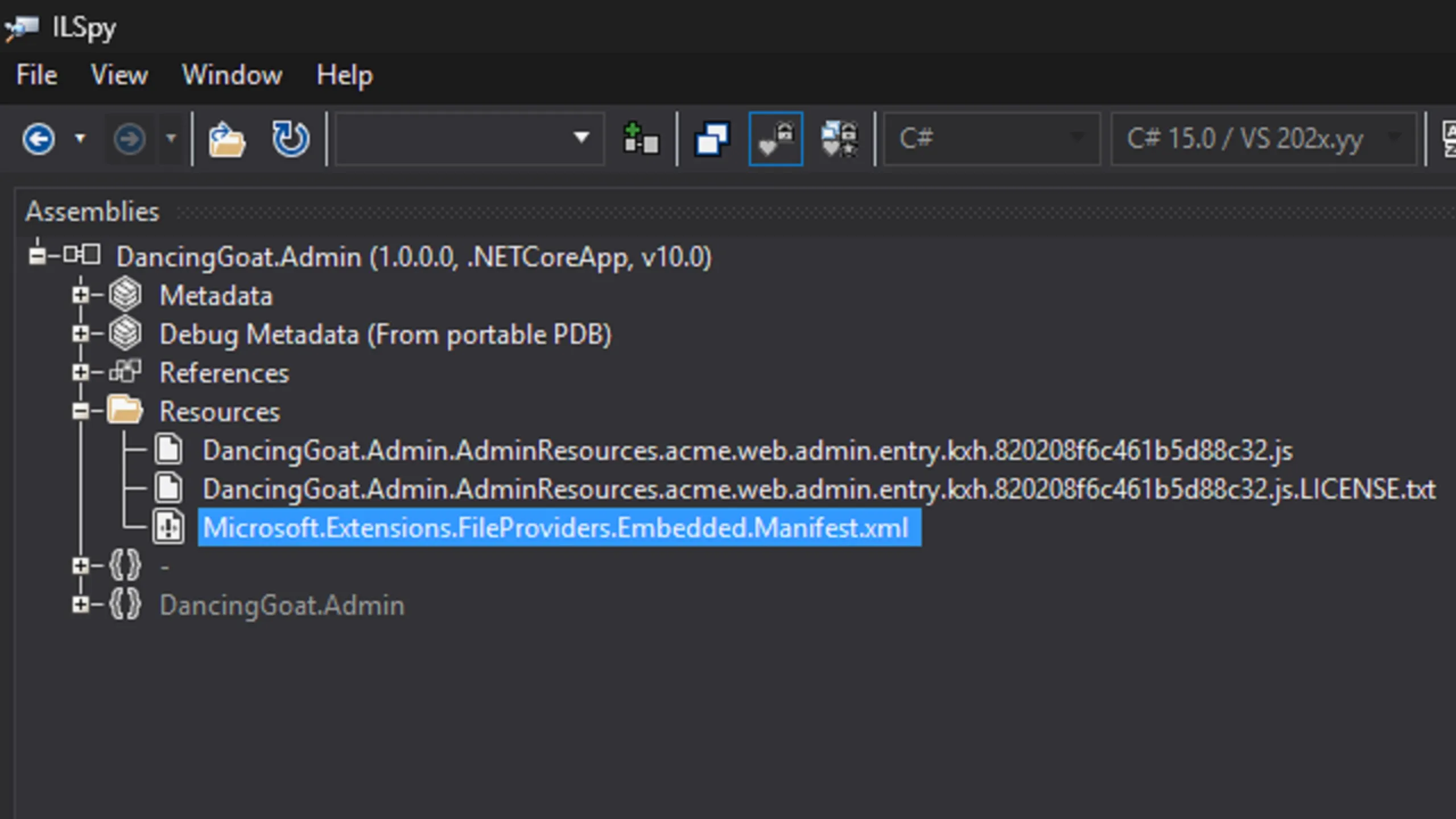
A healthy Embedded-mode build shows:
The compiled/minified bundle itself (
DancingGoat.Admin.AdminResources.acme.web.admin.entry.kxh.{hash}.js)Its
.LICENSE.txtA
Microsoft.Extensions.FileProviders.Embedded.Manifest.xmlmapping a virtual path (/AdminResources/acme.web.admin/entry.kxh.{hash}.js) to that resource — this virtual path is exactly what gets served at runtime asadmin/adminresources/{orgName}.{projectName}/entry.{hash}.js
From here you can check three things without touching the browser:
- Was the JS embedded at all? (see wrong
AdminClientPathglob below) - Does the manifest's virtual path match the
{orgName}.{projectName}naming convention used by your Admin class library.csproj, C# attributes, and webpack config? (see org/project name mismatch) - Does the decompiled bundle actually contain your component's code? (this technique comes up again in several of the issues below)
ILSpy for AI agents
ILSpy is also available as a dotnet tool command line app, ilspycmd, which has options specifically for embedded resources:
--list-resources: Lists all embedded resources in the assembly. Entries inside .resources containers are listed individually as '/ '. --resource <name>: Extract a single resource by name (as printed by --list-resources).
With this tool your AI agent can introspect and validate assemblies directly.
Different asset delivery modes, different problems
Xperience serves custom admin client bundles in one of two modes:
Embedded (default when
appsettings.jsonhas noCMSAdminClientModuleSettingssection): the client build output is compiled into the .NET assembly as embedded resources, served from the Xperience ASP.NET Core application administration internal APIs. This mode is always used when deploying an application, but could be used for local testing.Proxy: the ASP.NET Core app proxies asset requests to a running webpack dev server (
npm start, port 3009 by default), enabling hot reload. This mode is only used locally during active development.
Understanding these differences is key to diagnosing the issues below because some issues only appear in each mode and the same issue might have different symptoms depending on the mode.
.NET caches build artifacts
In the case that you identify the cause of your problem using a scenario below and make the suggested change to your project but still see inconsistencies and the issue remains unresolved, be sure to clear the cache of your build assets.
This is especially true if you are working in Embedded mode.
- Delete the
Admin/Client/distfolder - Re-run the
webpack build - Run a
dotnet cleanon the solution - Run
dotnet runon the ASP.NET Core app
Why is this process necessary? .NET might not regenerate the embedded assets in the assembly, even if you make changes to your project in all the right places. Completing each step above should resolve this.
Only perform this thorough cleaning when changing the asset configuration in your Admin project.
Use agents to validate code and configuration
AI agents are very efficient at reviewing documentation and project code, identifying patterns or inconsistencies. Do not skip using this valuable tool!
When you run into a problem, combine Xperience's documentation on extending the administration interface and this article to give your agents the guidance and context they need.
If they can't resolve the problem autonomously, they can at least create a summary of information about your project and configuration. You should use this to diagnose the issue or point you in the right direction for further exploration.
Issue: Broken client module registration
Symptom, Proxy mode: The app fails at startup with an OptionsValidationException indicating the configured module name could not be found.:
Unhandled exception.
  Microsoft.Extensions.Options.OptionsValidationException:
    Invalid module settings for 'acme-web-admin' in the 'CMSAdminClientModuleSettings' option.
    A module with such name could not be found.
For this example, you have the following in your appsettings.Development.json:
"CMSAdminClientModuleSettings": {
  "acme-web-admin": {
    "Mode": "Proxy"
  }
}
But this C# in your WebAdminModule.cs:
protected override void OnInit()
{
    base.OnInit();

    RegisterClientModule("acme", "admin");
}
The CMSAdminClientModuleSettings key is spelled correctly here, but validation checks it against the set of modules actually registered via RegisterClientModule. A misspelled or missing C# registration call produces an identical error message to a misspelled appsettings.Development.json settings key.
Symptom, Embedded mode: The app starts fine; the failure only appears in the browser when the admin shell tries to load the page:
Error: Unable to resolve bare specifier '@acme/web-admin' from http://localhost:6834/admin/
  (SystemJS Error#8 ...)
Root cause: RegisterClientModule("acme", "web-admin") in WebAdminModule.cs's OnInit() is misspelled or missing. This is a different symptom for the same cause as the scenario above because we've switched to Embedded mode.
Two other root causes produce these same symptoms, even when RegisterClientModule(...) itself is written correctly, because both prevent OnInit() from ever running:
Missing
[assembly: CMS.AssemblyDiscoverable]— without it, Xperience never discovers the module class in the assembly.Missing
[assembly: CMS.RegisterModule(typeof(WebAdminModule))]— the assembly is discoverable, but Xperience isn't told this specific class is a module to initialize at startup.
Both are boilerplate assembly-level attributes generated by the Admin project template. They are easy to miss when generating your Admin extension project manually, or if an AI agent regenerates or moves a file and drops an attribute it doesn't recognize as important.
Resolution: The SystemJS error number tells you which class of naming problem you have:
| Error | Meaning | Check |
|---|---|---|
| Error #8 — "unable to resolve bare specifier" | The module prefix was never registered under that name | RegisterClientModule call, AssemblyDiscoverable/RegisterModule attributes |
Error #3 — "error loading" a specific .js URL |
The prefix resolved, but the asset path it pointed to doesn't exist | .csproj MSBuild properties vs. RegisterClientModule args (see naming mismatch below) |
Restore whichever of the three is missing: the RegisterClientModule(...) call itself, [assembly: CMS.AssemblyDiscoverable], or [assembly: CMS.RegisterModule(typeof(...))].
Prevention: This issue (and the next one) clearly supports using AI to setup your Admin UI extension project and generate new components because agents excel at this kind of pattern consistency. Create your own skills to formalize this process or keep an eye out for new skills in the KentiCopilot GitHub repository.
Issue: Org/project name mismatch
Knowing every location in your code that requires matching values depends on which client asset delivery mode (Embedded or Proxy) you're running. This is what makes the mismatch easy to get wrong in a way that could stay hidden for a while.
The organizationName/projectName pair (example: acme/web-admin) shows up in four places:
The Admin class library
.csproj's<AdminOrgName>property and the<ProjectName>metadata on<AdminClientPath>(renaming reference)RegisterClientModule(orgName, projectName)in the Admin class libraryWebAdminModule.csThe
CMSAdminClientModuleSettingskey in the ASP.NET Core applicationappsettings.json(Proxy mode only)
Embedded mode
Symptom:
Assume you have an Admin project .csproj with the following:
<Project Sdk="Microsoft.NET.Sdk">
  <PropertyGroup>
    <AdminOrgName>acme</AdminOrgName>
  </PropertyGroup>
  <ItemGroup>
    <AdminClientPath Include="Client\dist\**">
      <ProjectName>abc</ProjectName>
    </AdminClientPath>
  </ItemGroup>
  <!-- ... -->
</Project>
But this C# in your WebAdminModule.cs:
protected override void OnInit()
{
    base.OnInit();

    RegisterClientModule("acme", "web-admin");
}
And you see an error like this:
Uncaught SyntaxError: Unexpected token '<' (at entry.js:1:1)
Root cause: The .csproj's <ProjectName> metadata (say, abc) doesn't match the arguments passed to RegisterClientModule("acme", "web-admin") in WebAdminModule.cs, but your C# registration attributes for React components match that RegisterClientModule call.
This compiles fine, however, at runtime when the custom React components are needed, the admin shell's SystemJS-based module loader requests a bundle path built from the RegisterClientModule arguments (acme.web.admin) that doesn't correspond to where the .csproj actually embedded the bundle (acme.abc).
This is the same symptom as the wrong AdminClientPath glob below.
Resolution: Make the .csproj's <AdminOrgName>/<ProjectName> and the RegisterClientModule(...) arguments match exactly.
Proxy mode
Symptom: The app fails at startup, before it serves a single request:
Unhandled exception.
  Microsoft.Extensions.Options.OptionsValidationException:
    Invalid module settings for 'acme-abc' in the 'CMSAdminClientModuleSettings' option.
    A module with such name could not be found.
Root cause: In Proxy mode, the pairing that matters is different: RegisterClientModule(orgName, projectName)'s arguments must match the key under CMSAdminClientModuleSettings in appsettings.json (hyphen-joined — acme-web-admin). Xperience validates this one at startup, so it fails before any of the Admin UI loads.
In Proxy mode, the .csproj MSBuild values have no effect on the application's behavior: they only drive Embedded-mode asset packaging.
Although the assets are embedded in the assembly during each .NET build, a .csproj/RegisterClientModule mismatch (the Embedded-mode issue above) can sit through an entire Proxy-mode development cycle without producing any symptom and only surface the day someone builds or ships an Embedded build.
orgName and projectName in webpack.config.js
You might notice an orgName and projectName value passed to Xperience's baseWebpackConfig function, which ensures the webpack generated artifact is correctly configured.
These values actually have no observable effect today, in either mode, similar to package.json's name field, which is likewise cosmetic.
Why? Per-module lazy loading requires these values to match the rest of the application. However, Xperience doesn't currently support this feature (more on this is noted below).
If that capability is added later, these webpack values must be configured correctly. Make sure you keep them in sync as a forward-compatible habit; nothing reads them today, but that may not stay true.
Every C# attribute has its own independent prefix
Even with RegisterClientModule, the .csproj, and appsettings.json all correctly configured and mutually consistent, a single UIApplication/UIPage/etc. attribute with a mistyped @{orgName}/{projectName}/... prefix fails the same way as a module that was never registered:
Uncaught Error:
  Unable to resolve bare specifier '@acme/abc' from
  http://localhost:6834/admin/
  (SystemJS Error#8 https://github.com/systemjs/systemjs/blob/main/docs/errors.md#8)
This error was caused by the following component C# registration attribute. See if you can find the issue:
// Yes, this is difficult to read both here _and_ in the source code
[assembly: UIApplication("Acme.CustomTemplate", typeof(CustomTemplate), "CustomTemplate", "CustomApp", AcmeWebAdminModule.CUSTOM_CATEGORY, Icons.Clock, "@acme/abc/CustomLayout")]
SystemJS's import map only has an entry for the prefix actually registered via RegisterClientModule. This attribute is asking for a different one, so it fails the same way a never-registered module would, even though the real module is configured correctly elsewhere.
Prevention:
Use named attribute arguments, not positional ones. A git diff on the named form shows exactly which argument changed (templateName); a positional diff shows only an unlabeled string change in an argument list.
[assembly: UIApplication(
    identifier: "Acme.CustomTemplate",
    type: typeof(CustomTemplate),
    slug: "CustomTemplate",
    name: "CustomApp",
    category: AcmeWebAdminModule.CUSTOM_CATEGORY,
    icon: Icons.Clock,
    templateName: "@acme/web-admin/CustomLayout"
)]
Additionally, once you have this convention established and AI agents generating most of your code, this problem is unlikely to recur.
orgName and projectName in package.json
Client/package.json's "name" field (acme-web-admin in the Xperience .NET template) shares the same naming pattern, but nothing in the webpack build, the .csproj, or any C# attribute reads it. It's cosmetic npm metadata and can be set to anything without affecting the module.
Issue: Wrong AdminClientPath glob
Symptom: Using embedded mode, the browser console shows:
Uncaught SyntaxError: Unexpected token '<' (at entry.js:1:1)
This error is misleading: it reads like a JavaScript syntax bug in your component, because the response body for entry.js isn't JavaScript at all. Instead, it's an HTML fallback/error page (hence the leading <) interpreted as JavaScript.
Root cause: The .csproj's <AdminClientPath> glob doesn't point at the client project's actual build output:
<!-- Wrong: missing the Client\ segment -->
<ItemGroup>
  <AdminClientPath Include="dist\**">
    <ProjectName>web-admin</ProjectName>
  </AdminClientPath>
</ItemGroup>
The client build actually lives at Client\dist\**, not a top-level dist\** relative to the .csproj. MSBuild doesn't error on a glob that matches zero files, so your client assets are not embedded.
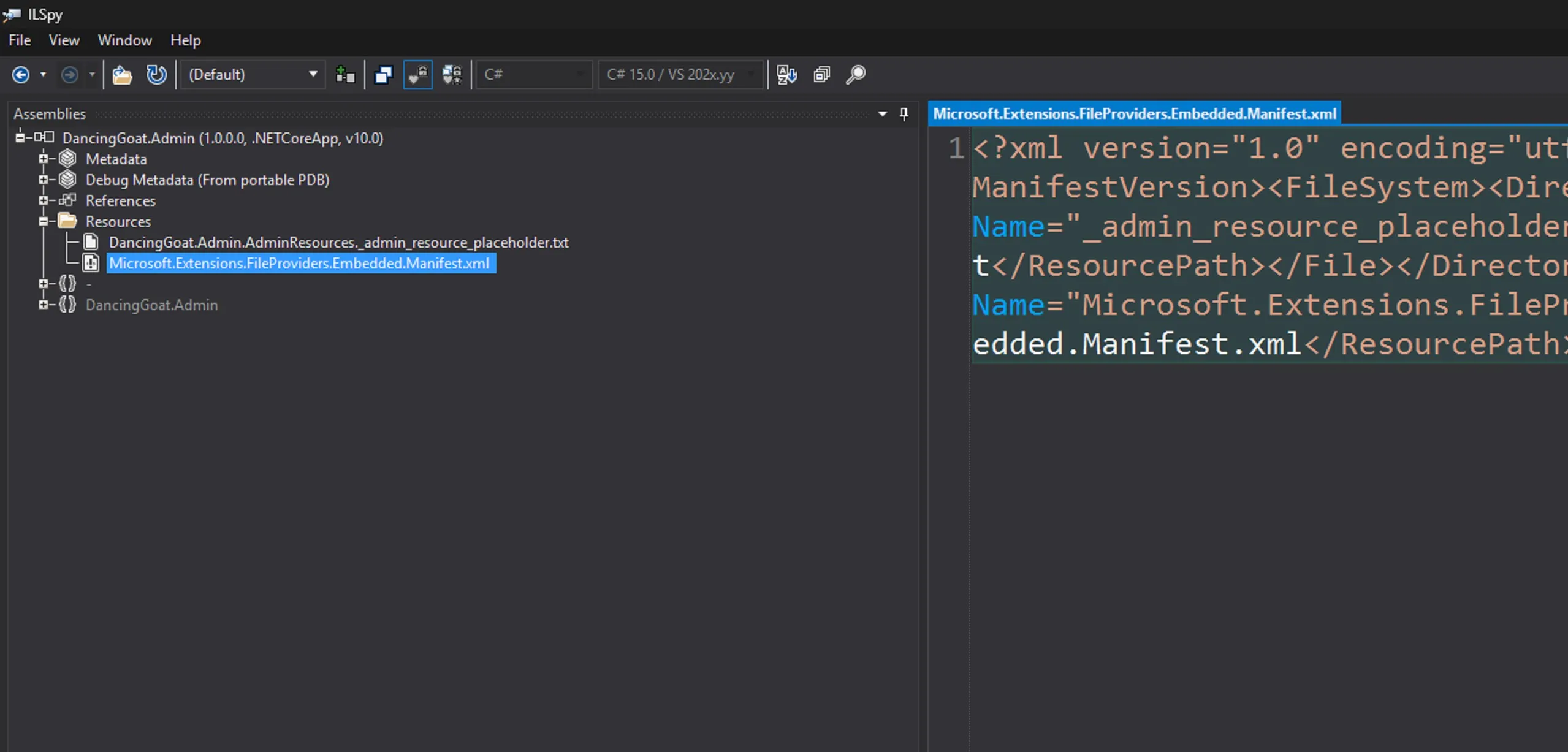
We can confirm this with ILSpy: the assembly's Resources node contains only the boilerplate _admin_resource_placeholder.txt and the standard manifest, no bundle files at all:
You can also see why the console error mentions a < by opening your browser dev tools, filtering to the entry.js that was requested and seeing a 200 response.
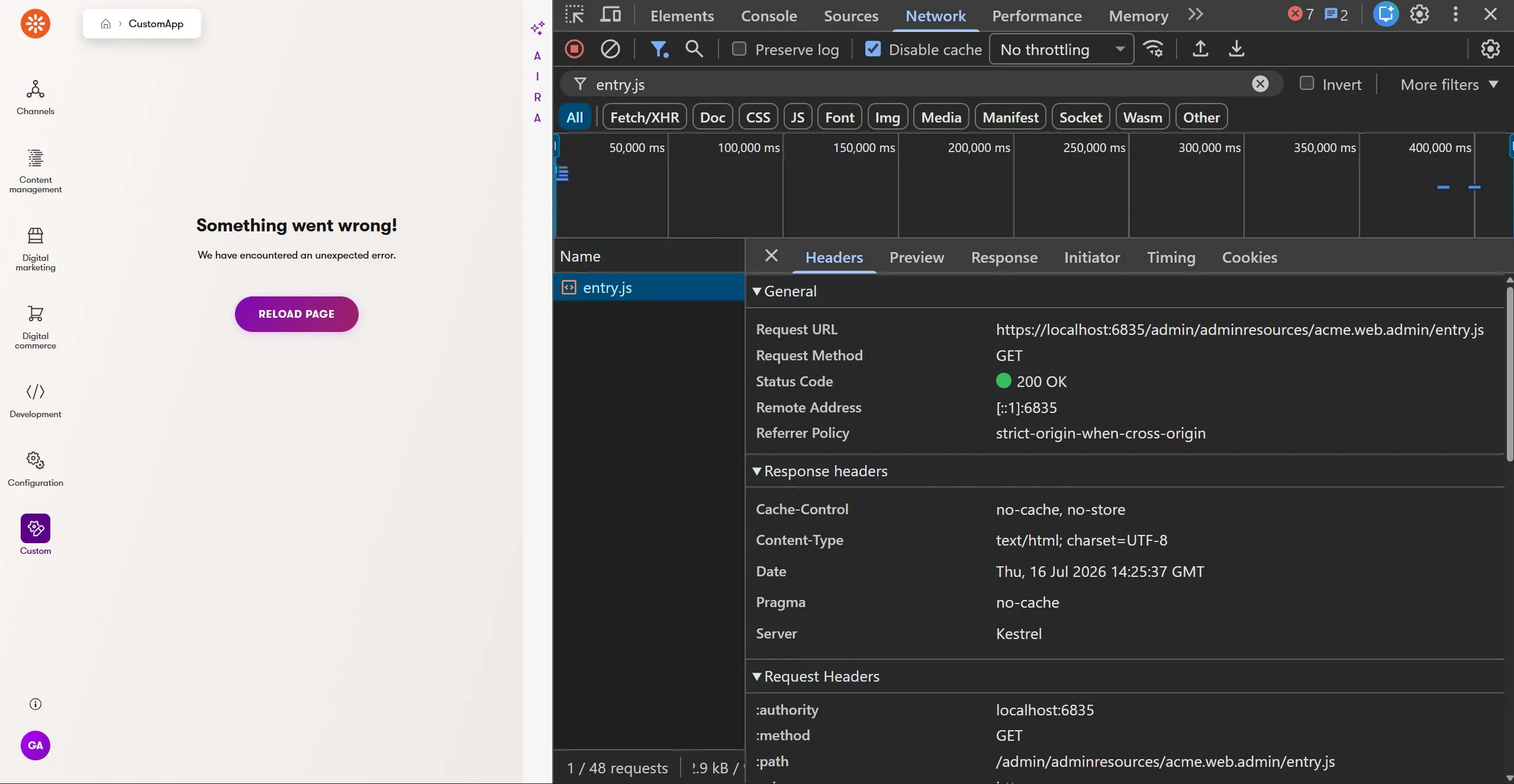
This is counterintuitive but can be explained.
- The
RegisterClientModule("acme", "web-admin")call and C# registration for the React componenttemplateName: "@acme/web-admin/CustomLayout"match. - Xperience generates an asset path it knows it can handle:
/admin/adminresources/acme.web.admin/entry.js. - The Admin assembly contains no matching resource. It only has assets matching the
acme.abcidentifier. - The Xperience administration UI middleware takes over and returns a normal full HTML page rendered with a 404 message.
Resolution: Correct the glob:
<AdminClientPath Include="Client\dist\**">
  <ProjectName>web-admin</ProjectName>
</AdminClientPath>
Prevention: Use ILSpy to check for a missing bundle as part of your project validation process before chasing SystemJS error numbers. The issues already mentioned above (org/project naming, missing registration) assume some bundle is being embedded and served; they just fail to resolve or load it correctly. If nothing was embedded in the first place, those diagnoses don't apply yet.
Issue: Embedded vs. Proxy delivery mode confusion
Each asset delivery mode - Proxy and Embedded - is optimized for specific scenario. Misunderstanding these scenarios leads to common failure patterns:
A developer runs
npm start(Proxy mode) but never adds the correspondingCMSAdminClientModuleSettingsentry, so the app keeps loading stale Embedded-mode resources. Changes appear to have no effect.Embedded-mode changes require rebuilding both the client project and the web application in that order; rebuilding only one produces the same "no effect" symptom.
Proxy mode gets left enabled in a shared or deployed environment, and the admin UI tries to reach a dev server that was never meant to run there.
Symptom, dev server not running: Proxy mode is otherwise configured correctly, but npm run start isn't running:
GET http://localhost:6834/admin/acme.web.admin/entry.js
  net::ERR_ABORTED 500 (Internal Server Error)
The browser alone makes this look like a generic server error. The ASP.NET Core app's own console names the actual problem:
fail: Kentico.Web.Mvc.KenticoErrorHandlingMiddleware[0]
      System.Net.Http.HttpRequestException:
        Failed to proxy the request to http://localhost:3009/entry.js,
        because the request to the proxy target failed.
        Check that the proxy target server is running
        and accepting requests to http://localhost:3009/.

The underlying exception message was
  'No connection could be made because the target machine actively refused it.
  (localhost:3009)'
Resolution: Start the webpack dev server before or alongside the ASP.NET Core app, or turn CMSAdminClientModuleSettings off if a dev server isn't meant to be running.
When the browser console error is generic (500, ERR_ABORTED, a vague SystemJS message), check the .NET app's own console/log output first.
This pattern — an informative server log paired with an uninformative browser error — repeats through Proxy mode's failure modes, including the HTTPS/certificate issue below. Proxy mode is a two-process workflow, and it's easy to let the dev server lapse when switching terminals or branches, or when starting a new task with an agent.
Prevention: If a human is viewing the UI and validating, stick to proxy mode for local development, but consider making embedded mode validation part of your CI/pull request process so you cover all your bases.
AI agents might work better under a code → build → test loop using embedded mode. They can sometimes struggle with compiler "watch" mode.
Issue: Proxy mode fails under HTTPS
Symptom, Proxy mode: Running the ASP.NET Core app under HTTPS (common for local parity with production, or third-party OAuth providers requiring HTTPS callbacks) — for example in your ASP.NET Core app launchSettings.json:
"applicationUrl": "https://localhost:6835"
The rest of the admin UI loads and works normally; only hot reload breaks:
WebSocket connection to 'wss://localhost:3009/ws' failed:
  Error in connection establishment: net::ERR_SSL_PROTOCOL_ERROR
Root cause: A page loaded over HTTPS forces the browser to upgrade WebSocket connections to wss:// as well. This is standard web browser security and unrelated to Xperience.
If the webpack dev server is left at its default plain-HTTP configuration, the hot module reloading (HMR) socket is plain ws:// unless explicitly configured for TLS, so the secure page's wss:// attempt hits a socket that isn't speaking TLS, and the handshake fails.
Resolution: Configure both sides for HTTPS consistently:
Configure webpack's dev server with certificates — see Kentico Community Portal's
webpack.config.jsfor a working reference that shares the localdotnet dev-certscertificate with webpack.Set
"UseSSL": trueon the module'sCMSAdminClientModuleSettingsentry in yourappsettings.Development.json:"CMSAdminClientModuleSettings": { "acme-web-admin": { "Mode": "Proxy", "Port": 3009, "UseSSL": true } }
Variant: both sides on HTTPS, but the dev server's certificate isn't trusted
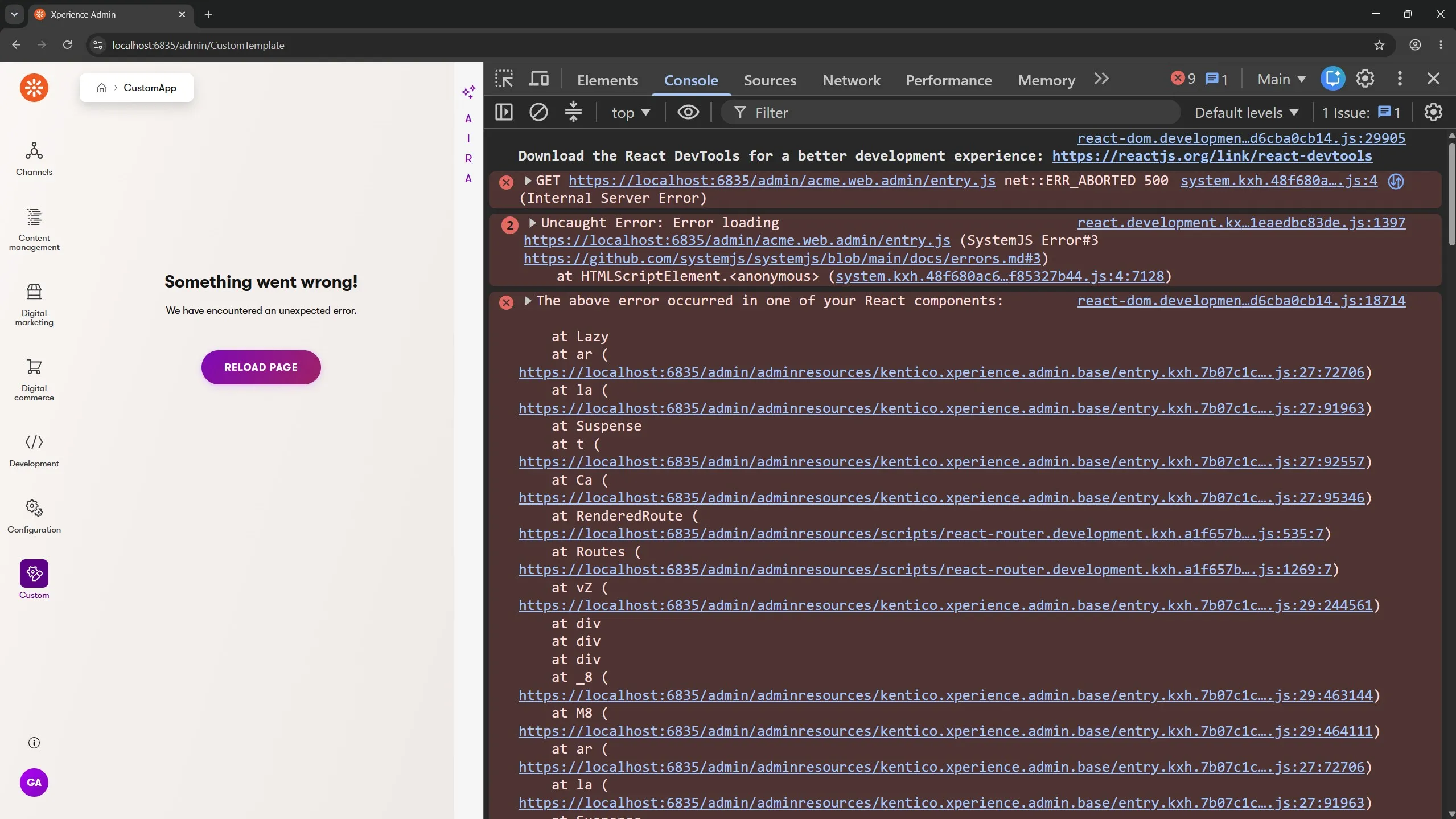
Symptom: Even with UseSSL: true configured on both sides, an untrusted certificate (a self-signed cert instead of the shared dotnet dev-certs certificate) produces three layers of diagnostic information, each more specific than the last:
The browser console gives a very generic message:
GET https://localhost:6835/admin/acme.web.admin/entry.js
  net::ERR_ABORTED 500 (Internal Server Error)
Uncaught Error:
  Error loading https://localhost:6835/admin/acme.web.admin/entry.js
  (SystemJS Error#3 ...)
The ASP.NET Core app console, closer but still general:
fail: Kentico.Web.Mvc.KenticoErrorHandlingMiddleware[0]
      System.Net.Http.HttpRequestException:
        Failed to proxy the request to https://localhost:3009/entry.js,
        because the request to the proxy target failed.
        Check that the proxy target server is running
        and accepting requests to https://localhost:3009/.

The underlying exception message was
  'The SSL connection could not be established, see inner exception.'
Navigating directly to the failing asset URL in a new tab, where the ASP.NET Core developer exception page names the real cause:
AuthenticationException:
  The remote certificate is invalid because of errors in the certificate chain: UntrustedRoot
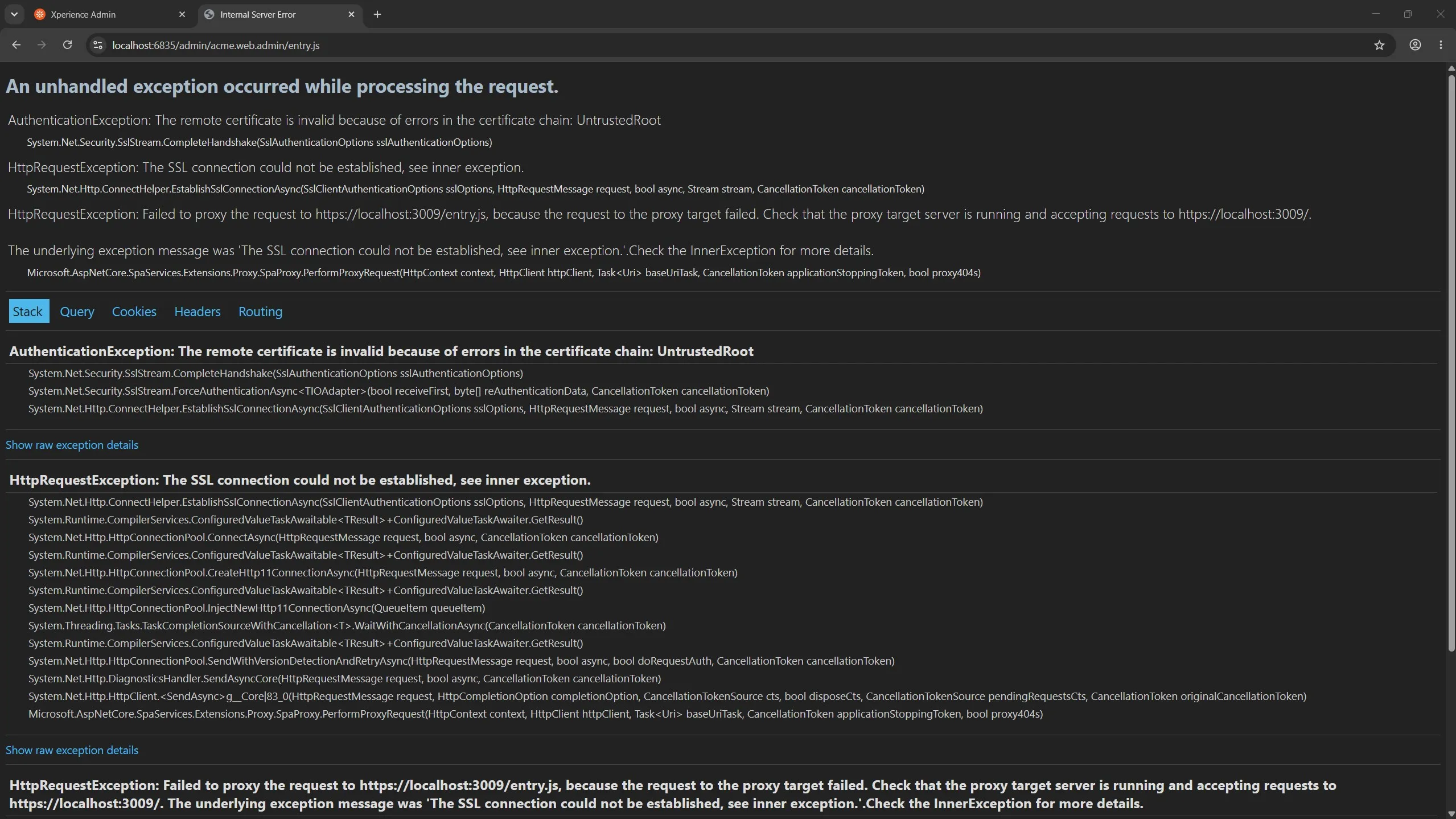
Root cause: The Xperience proxy middleware's own log line summarizes the underlying exception in general terms ("SSL connection could not be established"). The full AuthenticationException only appears on the ASP.NET Core dev exception page, reached by navigating to the asset URL directly.
Resolution: Make sure the webpack dev server's HTTPS certificate is trusted by the machine, typically the shared dotnet dev-certs certificate rather than an ad hoc self-signed one.
This often shows up well after initial setup, on a machine that previously worked without issue.
Why? Installing a new major .NET version for the first time regenerates and re-trusts a new dotnet dev-certs certificate. If webpack was configured with a copy of the old cert, that copy is now stale, even though it worked before the .NET SDK update.
Or, if you are using self-signed certs, the certificate simply expires over time, which results in the browser not trusting it.
When a Proxy-mode browser console error is generic, load the failing asset URL directly in a new tab before digging further; the ASP.NET Core dev exception page frequently contains the real exception that the proxy middleware's log line only summarizes.
If HTTPS Proxy mode stops working on a machine where it previously worked, check certificate freshness and trust before assuming the project itself changed.
Prevention: This is just one of those infrastructure details you need to be aware of when using HTTPS and certificates across multiple applications.
Issue: The component is not accessible to Xperience
Symptom: The build succeeds. TypeScript and webpack give no warning, since entry.tsx's re-export list isn't type-checked against how the admin shell resolves components by name. At runtime, the admin UI shows its generic error boundary:
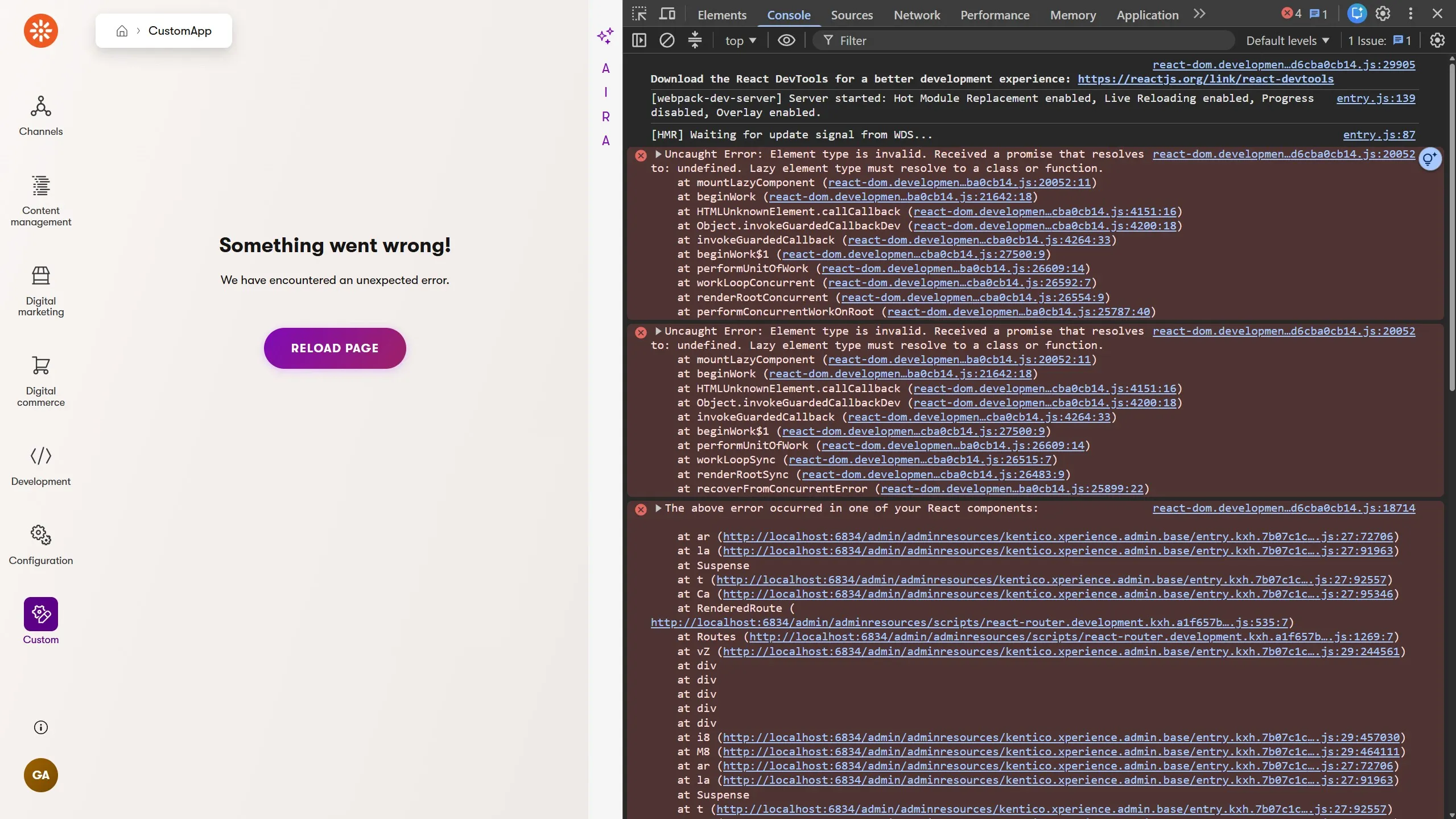
Uncaught Error:
  Element type is invalid.
  Received a promise that resolves to: undefined.
  Lazy element type must resolve to a class or function.
The stack trace bottoms out in the admin shell's own bundle, around mountLazyComponent/Suspense, because the admin shell resolves custom components through its own internal React.lazy-style loader.
The lazy import resolved to undefined, but the component's own code is correct and the C# registration attribute is present and valid.
Root cause: The component was implemented correctly, but its export is missing from Client/src/entry.tsx:
// entry.tsx — pretend this next line is missing/removed
export * from './custom-layout/CustomLayoutTemplate';
Resolution: Ensure all components referenced in C# registration attributes are exported from the entry.tsx.
Symptom: A second, harder-to-spot variant causes the same error: the exported component name doesn't match what the C# registration attribute string resolves to, even when the component is correctly exported. For example:
// CustomTemplate.cs
[assembly: UIApplication(
    identifier: "Acme.CustomTemplate",
    type: typeof(CustomTemplate),
    slug: "CustomTemplate",
    name: "CustomApp",
    category: AcmeWebAdminModule.CUSTOM_CATEGORY,
    icon: Icons.Clock,
    templateName: "@acme/web-admin/CustomLayout"
)]
// CustomLayoutTemplate.tsx
export const CustomLayout = ({ label }: CustomLayoutProps) => {
  /* ... */
}
The attribute templateName argument string above names the logical component (CustomLayout), but for page-template-style client components Xperience appends a Template suffix convention: the export the admin shell looks for is CustomLayoutTemplate, not CustomLayout.
Two independent, equally reasonable assumptions get this wrong: that the file name (CustomLayoutTemplate.tsx) has to match the registration string (it's irrelevant; only the exported symbol name matters), and that the exported symbol has to match the attribute string verbatim (it misses the implicit Template suffix).
Either mistake reproduces the same "Lazy element type must resolve to a class or function" error.
Prevention: The naming contract for a page-template-style component has three parts: the org/project prefix, the attribute string's own segment, and the implicit {Name}Template suffix.
Implicit naming conventions
This implicit naming convention issue might appear for your other components as well.
For example, if you want to use a custom component in a listing table cell, you will need to reference it without the TableCellComponent suffix in C#, but include that suffix in the React component's name.
You can see this in the Kentico Community Portal for the Link and Icon table cell components:
LinkTableCellComponent- React component and C# referenceIconTableCellComponent- React component and C# reference
Additional notes: a few more worth knowing
Here are a few more scenarios you might encounter, unrelated to the typical configuration issues already mentioned.
JavaScript Dynamic import works in Proxy mode but fails in Embedded mode
Nothing in TypeScript, ESLint, or webpack stops you from writing React.lazy(() => import(...)) in a custom admin component, a pattern most React developers (and AI agents) reach for out of habit.
Symptom: In Proxy mode it works: the babel compiler and webpack dev server split it into its own chunk and serves it on demand.
In Embedded mode, webpack's production build produces two files for the module (the main bundle plus a split chunk) which look correct, but Xperience's embedded-resource-mapping logic assumes exactly one file per module and throws at app startup, before a single request is served:
Unhandled exception.
  System.InvalidOperationException:
    Expected 1 file for source path '/adminresources/acme.web.admin/entry.js'
    in directory '\adminresources\acme.web.admin', but got '2'.
Root cause: Simply put, dynamic import() is not yet supported in Xperience.
Because this works throughout Proxy-mode development, it can ship unnoticed and then fail the entire application at startup when running with assets in Embedded-mode.
Prevention: It's best practice to have AI agents build a library of end-to-end (E2E) tests for you to validate changes to customer experiences and the Xperience administration.
Specific version for system dependencies
Symptom: Bumping react/react-dom npm packages to v19.x in the client package.json produces the same error in both delivery modes:
Uncaught TypeError:
  Cannot read properties of undefined (reading 'recentlyCreatedOwnerStacks')
The error string doesn't mention React versions and instead looks like an issue with React's API.
Root cause: Xperience (as of this Refresh) requires React 18 specifically and is stated in the system requirements docs.
Prevention: Make sure your agent refers to Xperience's system requirements and the product Changelog before updating packages.
Different npm and NuGet package versions
Symptom: Although your project might work correctly today when using outdated Xperience npm packages, a future major Xperience version that removes long-deprecated APIs could break client code relying on them.
So far, these npm packages have proven to be very backwards compatible - even by one or two major versions.
Therefore, there's no established habit of checking npm-vs-NuGet alignment before that happens and problems related to this could appear unexpectedly.
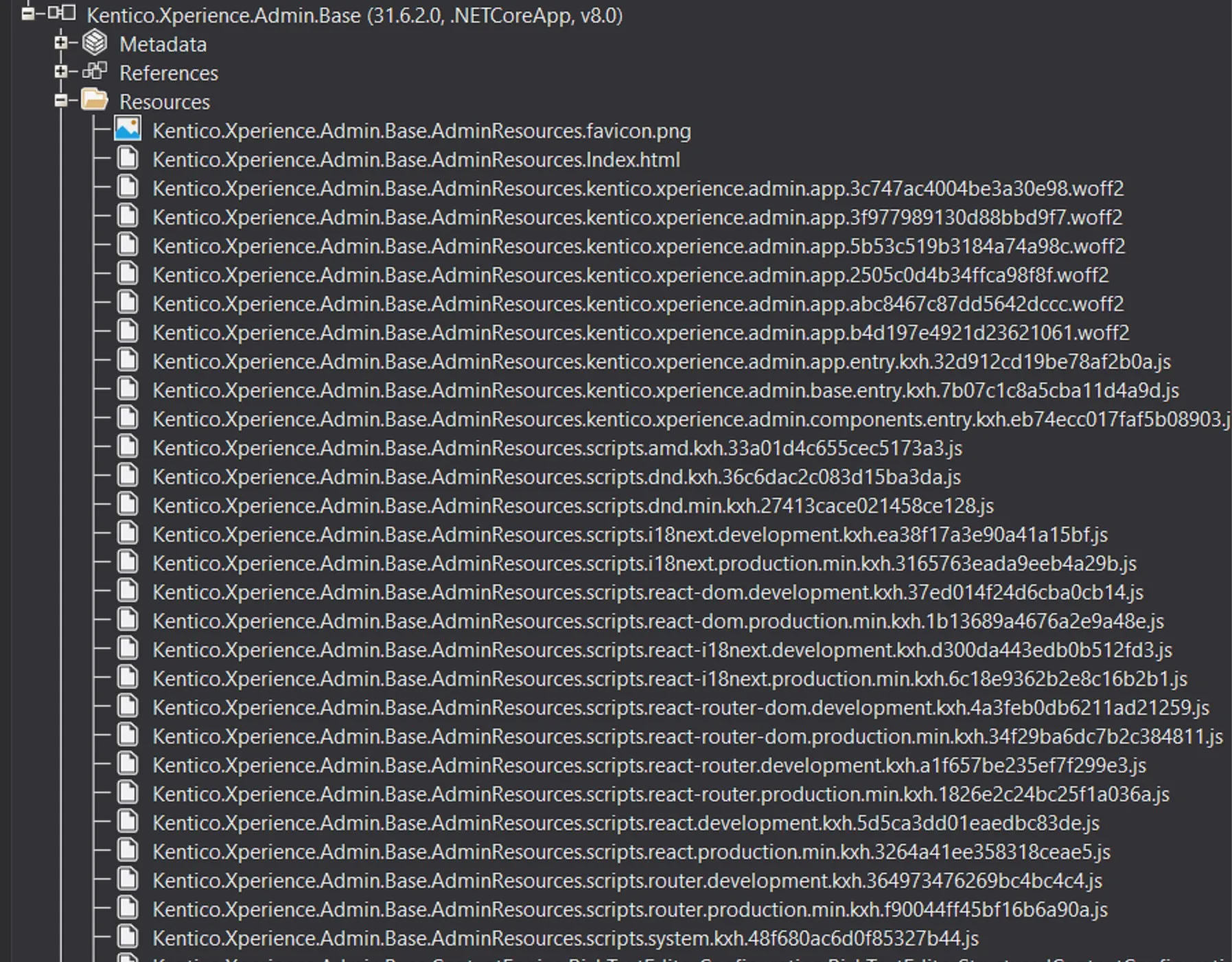
Root cause: Xperience's own .NET assemblies embed React and the admin shell's dependent libraries, and project client code only ever consumes what Xperience loads and exposes at runtime, not whatever version is declared in package.json.
Prevention: The docs recommend keeping @kentico/xperience-admin-* npm packages in sync with the kentico.xperience.admin NuGet version, alongside any other dependency updates made when updating an Xperience project.
Instruct your agent to update those packages when applying a hotfix or Refresh, regardless of whether anything appears broken.
Using AI agents to optimize this experience
Everything above applies whether a human or an AI agent wrote the code. A few things make this area easy for an agent to get wrong without noticing:
Training data lags SDK versions.
kentico.xperience.admin.*NuGet and the@kentico/xperience-admin-*npm packages update with every Refresh. Even with the rapid pace of frontier models, an agent's knowledge of Xperience's APIs may reflect an older version, producing code that compiles against stale concepts rather than the referenced package.
This is why you should always use the Kentico Docs MCP server.No visual feedback loop. An agent working without a browser or screenshot loop can't tell "compiles and registers correctly" apart from "compiles but renders a broken admin page," which covers most of the issues above.
However, you can give agents access to the browser via MCP server tools so they have the context to diagnose and solve these problems autonomously.Two build systems. An agent instructed to use a single build/test loop may rebuild or restart only one half of the stack after a change.
This is where our upcoming support for full agentic website development on Xperience by Kentico will help you provide the right context.
On the other hand, agents are fantastic at validating things that are easy for humans to overlook and, if instructed, keeping code consistent:
Difficult to diagnose errors. With two modes (Embedded/Proxy) and multiple configuration points, it can be difficult for a developer to find the root of a problem.
An agent can quickly review Xperience's docs and identify it, especially with this article as context.The org/project naming contract is a cross-file and requires consistency. Once you have a functioning Admin UI extension project and multiple custom Admin UI components on the C# and React side, your agent will have plenty of context to repeat the patterns, keep things consistent, and ensure changes are validated in the right places.
Administration extensions can be brittle and automated E2E tests are expensive. Agents can manage the test harness infrastructure, write your tests for you, and build a CI pipeline that runs them on every PR. The cost is going to 0, so why not reap the benefits?

Sean Wright
I'm Lead Product Evangelist and part of the Developer Experience division at Kentico. I work to help our community understand the strategy and value of Xperience by Kentico, with a focus on developers building digital experience solutions. I'm also responsible for Kentico's Community Programs.