
Chaining Automations in Xperience by Kentico: A Multi-Part Content Drip
A single Xperience by Kentico automation is a linear path. It can branch, but branches can't rejoin.
Once a contact takes the nudge path, there's no built-in way to bring them back into the main sequence without rebuilding the remaining steps on every branch. For a five-part content series with engagement checks at each step, that's not manageable.
The solution is to stop thinking of the series as one automation and start thinking of it as a workflow built from multiple automations. Each automation is responsible for one article and connects to the next through custom activities.
This article walks through the approach, including a reusable Page Builder widget that lets marketers control activity logging on any page without additional code changes after the initial build.
This is the detail article for Scenario 3 of Xperience Automations: You've Been Meaning to Explore Them. Here's What's Been Waiting. If you haven't read the main article yet, start there. It covers this scenario and four others, giving you the full picture before you dive in here.
This post was written for Xperience by Kentico v31.4.0. Please consult the documentation for any feature or API changes when using a different version. Be sure to check the System Requirements in the product documentation.
The architecture
Before getting into setup, it's worth understanding the shape of what we're building.
Each article in the Coffee Origins series gets its own automation, triggered by a custom activity logged at the end of the previous one. The chain looks like this:
Registration automation → logs dg_origins_0_registration → triggers Ethiopia automation → logs dg_origins_1_ethiopia (on engagement) → triggers Colombia automation → and so on through Kenya.
The 'nudge' path inside each article automation resolves to the same outcome as the engaged path. Either the contact re-engages and the next custom activity fires, or they don't, and the chain stops. There's no rejoining required because the next automation only starts when the activity is logged. Disengagement simply means the activity never fires.
This pattern scales with content and strategy changes.
Adding a sixth article means creating another automation and another custom activity. Removing an article means deleting one automation and updating one activity reference. Each automation is independently readable in Statistics.
Step 1: Registration automation
The registration automation handles double opt-in for the Coffee Origins email series. Its structure follows the same pattern as the newsletter reminder in Scenario 1, but instead of ending after the reminder, it hands off to the rest of the series.
Coffee Series registration
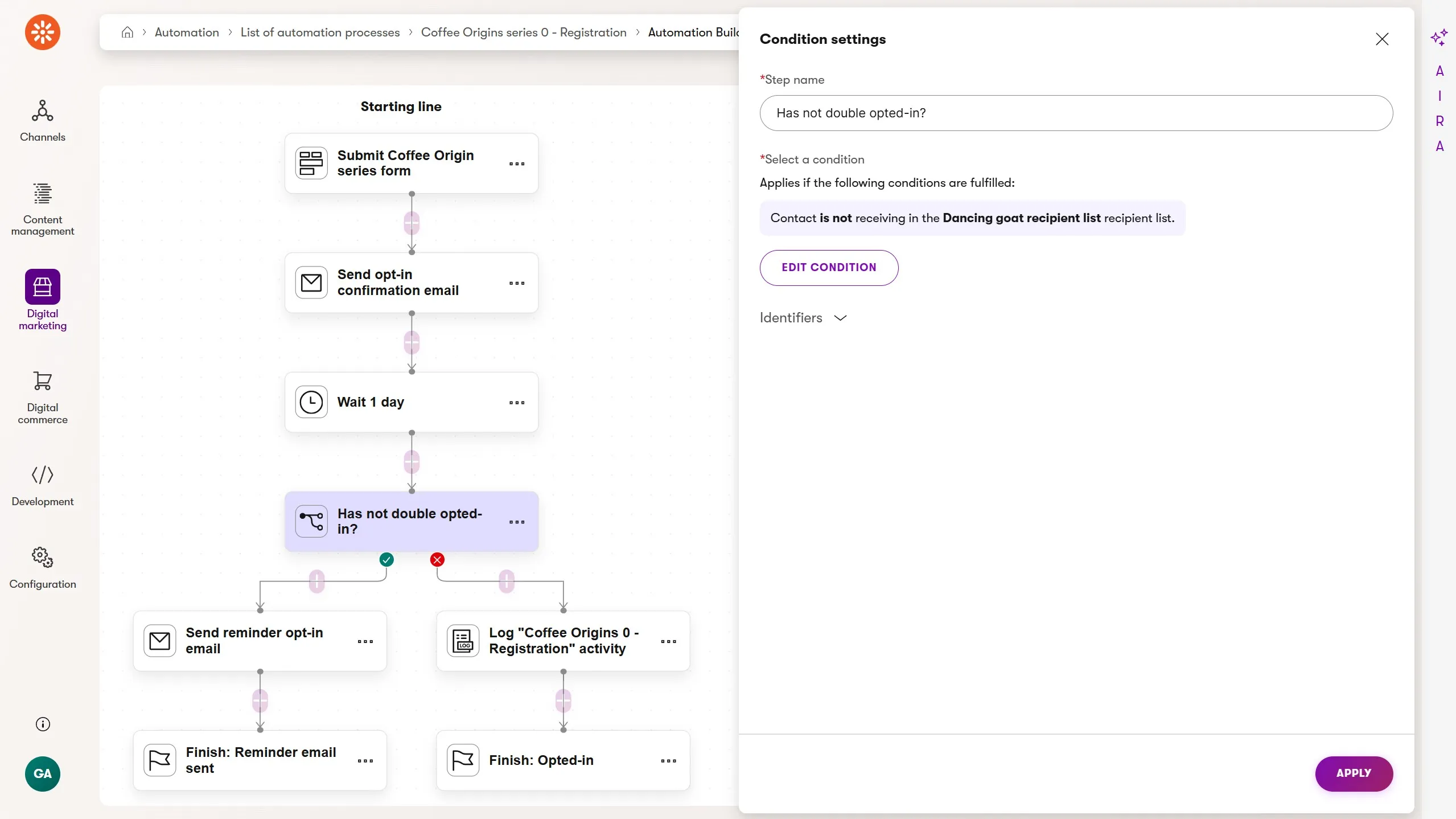
- Form submission trigger: runs when the visitor submits the Coffee Origins series form, found on Dancing Goat's article listing page.
- Send email: send the double opt-in confirmation email.
- Wait: 1 day, giving the visitor time to double opt-in
- Condition: is the contact already in the Coffee Origins recipient list?
- Send email: if not yet opted in, send the double opt-in reminder
- Log custom activity: if already opted in, log
dg_origins_0_registrationimmediately to trigger the first article automation - Finish: named finish steps for both branches: "Reminder sent" and "Already opted in"
Note that dg_origins_0_registration is logged by the automation only for contacts who were already opted in at the time of the condition check. Contacts who needed the reminder and then confirmed will have their activity logged by a widget on the confirmation page, which is covered in Step 2.
Step 2: Confirmation page widget
When a visitor completes the double opt-in by clicking the confirmation link in their email, they land on a recipient list confirmation page. This is the moment they become a confirmed Coffee Origins subscriber. It's also the moment we need to log dg_origins_0_registration to start the article sequence.
We could log this activity from the registration automation, but that would require the automation to wait indefinitely for confirmation. That isn't a good fit for how automations work.
Instead, the activity is logged directly on the confirmation page using a custom Conditional Activity Widget.
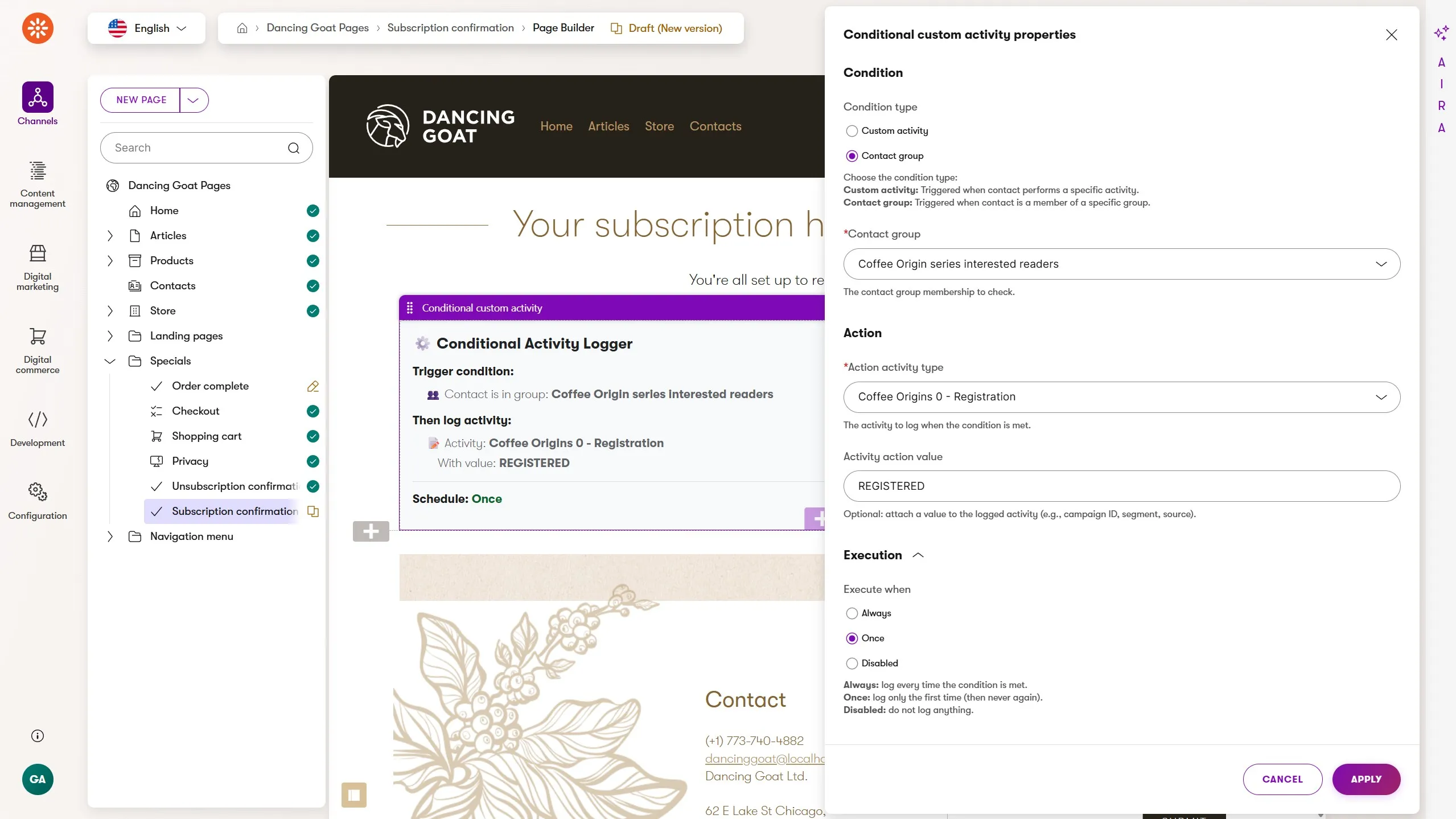
This widget is built once by a developer and then becomes a permanent tool in the marketer's Page Builder toolbox. Here's what it does:
The widget evaluates one of two possible conditions when a visitor lands on the page:
Has the visitor already performed a specific custom activity (with an optional value)?
Is the visitor currently in a selected contact group?
If the condition is met, the widget logs a custom activity:
Activity type: selected by the marketer from the available custom activity types
Activity value: optional, entered by the marketer
Execute when: always or only once (never logged this activity with this value before).
The widget is invisible to visitors.
In Page Builder modes, it displays its configured property values in a readable card so the marketer can verify the setup at a glance. In preview mode, it displays a minimal status message. On the live page, it renders nothing.
For the Coffee Origins confirmation page, the widget is configured as follows:
Condition: Condition: the visitor is in the contact group 'Coffee Origins interested readers,' which is defined as anyone who has submitted the Coffee Origins series form. This is important because the confirmation page is shared across all recipient lists; we only want to log this activity for visitors who came through the Coffee Origins registration path specifically.
Activity type:
dg_origins_0_registrationActivity value:
REGISTERED- we don't currently use the value in our automation, but it could be used later in customer journeys or audience segmentation.Frequency: only once
The widget source code is available on GitHub.
The Conditional Activity Widget "Execute when" property has a third option: Disabled.
This is useful when a marketer wants to temporarily disable the activity tracking. They can leave the widget on the page and then re-enable it later without having to reconfigure it.
Some of you might have already noticed the widget's contact group based condition is similar to Page Builder personalization, except it's limited to just this widget.
In fact, we could use personalization and remove the contact group condition entirely. I think it's helpful for marketers to see the full condition directly in Page Builder, but personalization combined with widgets that can be enabled or disabled and configured with different behavior properties makes for a powerful combination.
Step 3: Article automations
With the registration automation and confirmation page widget in place, the marketer can build the remaining automations independently. Each follows the same pattern.
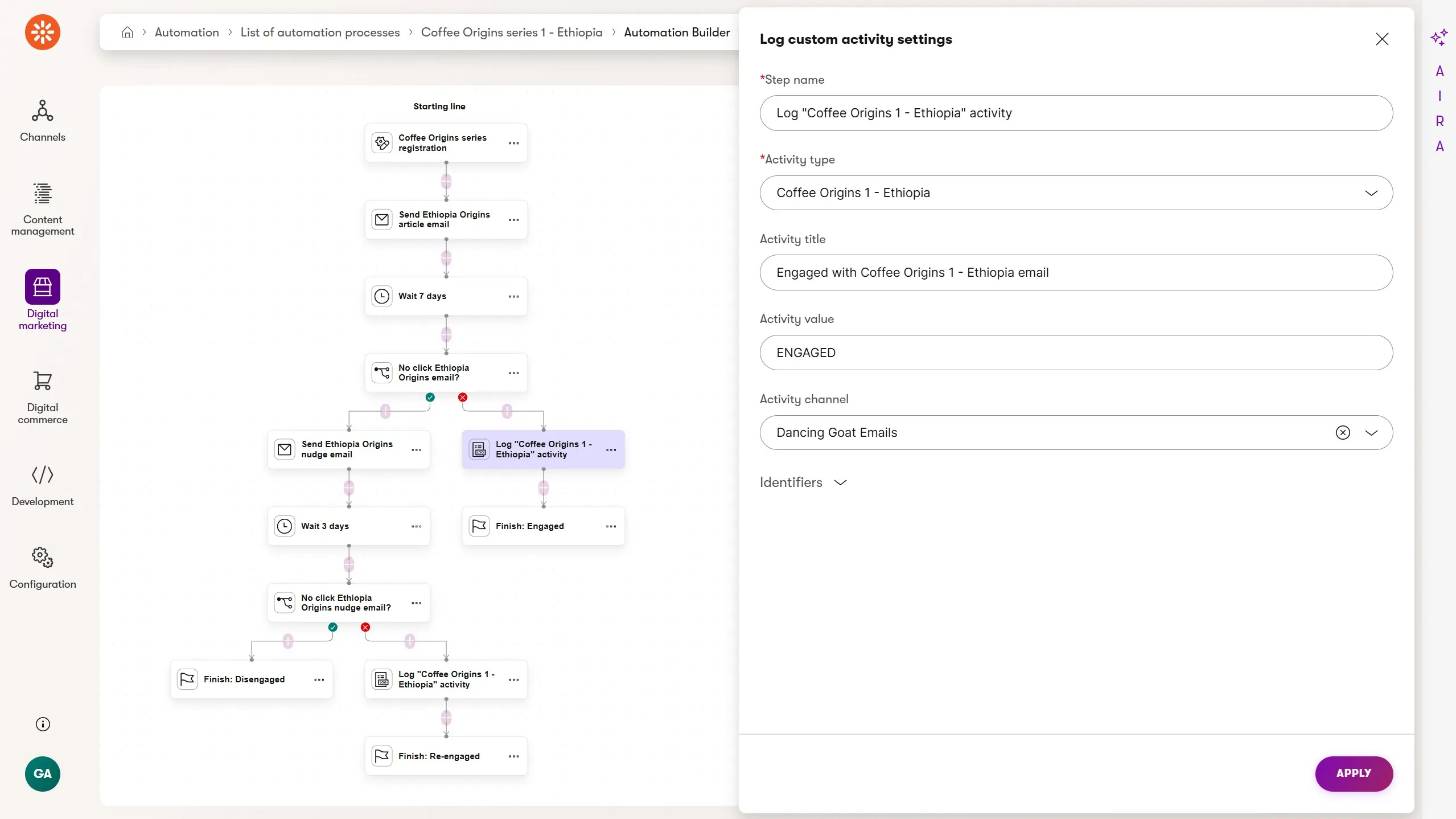
Ethiopia automation (first in the chain):
- Custom activity trigger:
dg_origins_0_registration - Send email: Ethiopia article announcement: teaser paragraph, farm story highlight, CTA to
/articles/origins-ethiopia - Wait: 7 days
- Condition: did the contact click a link in the Ethiopia email?
- YES branch: Log custom activity -
dg_origins_1_ethiopia→ triggers Colombia automation → Finish: ENGAGED - NO branch: Send nudge email - "Still with us? Here's the Ethiopia story again." Soft CTA back to the article, unsubscribe nudge for contacts who want out cleanly
- Wait: 3 days
- Condition: did they click the nudge email?
- YES: Log custom activity:
dg_origins_1_ethiopia→ same Colombia trigger → Finish: Re-engaged - NO: Log custom activity:
dg_origins_abandoned→ Finish: Disengaged
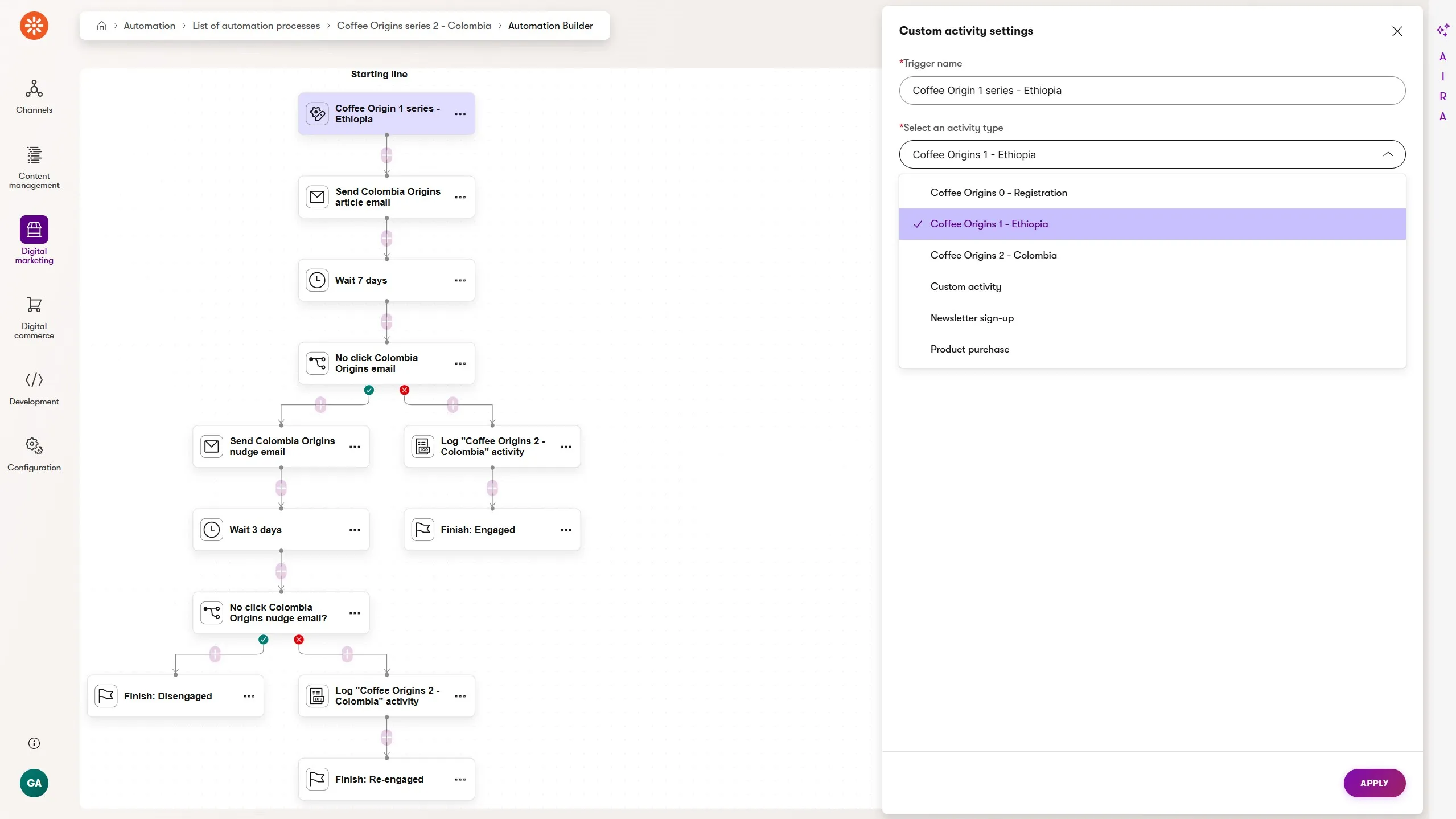
The Colombia, Guatemala, Sumatra, and Kenya automations follow the same pattern. Each is triggered by the previous article's custom activity, and each logs the next one on engagement or dg_origins_abandoned on disengagement.
The custom activity is what makes both the engaged and re-engaged paths converge on the same next step without any rejoining logic. Whether a contact clicked the original email or the nudge, logging dg_origins_1_ethiopia starts the Colombia automation.
The custom activity types
For reference, here are all the custom activity types this scenario requires, which are created in Contact Management → Activity types:
| Code name | Trigger role | Value needed |
|---|---|---|
dg_origins_0_registration |
Starts Ethiopia automation | No |
dg_origins_1_ethiopia |
Starts Colombia automation | No |
dg_origins_2_colombia |
Starts Guatemala automation | No |
dg_origins_3_guatemala |
Starts Sumatra automation | No |
dg_origins_4_sumatra |
Starts Kenya automation | No |
dg_origins_abandoned |
Available for re-engagement automation or contact group exclusion | No |
None of these activities require a value because the activity type alone provides the signal. This contrasts with the loyalty program scenario in Building a Loyalty Program Automation in Xperience by Kentico, where the activity value carries meaningful data.
What the marketer controls
Once the developer has built and deployed the Conditional Activity Widget and the custom activity types are registered, the marketer controls:
The registration landing page and article content and experiences
The registration automation
All five article automations
The Conditional Activity Widget configuration on the confirmation page, including which activity to log, which condition to check, and how often to log it.
All nudge email content and timing
The
dg_origins_abandonedactivity as a signal for downstream contact groups or a separate re-engagement automation
The developer's one-time contribution unlocks the full workflow.
Thanks to the custom activity trigger, the custom activity logging step, and the new Page Builder widget, marketers can guide their audience through multi-step automations across channels.
We can use built-in activities and website or email channel engagement as conditions.
Custom activities can be logged on web pages with our widget.
Headless activity tracking can let us bring headless channels into the automation process.
What to build next
The chaining pattern introduced here, with a custom activity as both the initial trigger and the handoff signal, is the foundation of the upcoming loyalty program scenario, where five separate automations map to five moments in a customer's journey toward a reward.
Event follow-up: How to Automate Event Registration and Attendance Follow-Up in Xperience by Kentico introduces a simpler two-automation pattern using physical attendance as the branching signal
Loyalty tiers: Building a Loyalty Program Automation in Xperience by Kentico takes the chaining pattern further with developer-provided activity hooks and contact field management
Back to the full picture: Xperience Automations: You've Been Meaning to Explore Them. Here's What's Been Waiting

Sean Wright
I'm Lead Product Evangelist and part of the Developer Experience division at Kentico. I work to help our community understand the strategy and value of Xperience by Kentico, with a focus on developers building digital experience solutions. I'm also responsible for Kentico's Community Programs.