
How to Automate Event Registration and Attendance Follow-Up in Xperience by Kentico
In-person events create a segmentation challenge that most digital marketing tools aren't built to handle cleanly: attendance happens in the physical world, but the follow-up experience needs to live in the digital one.
This article walks through how Dancing Goat's Brew Lab event automation bridges that gap and why the approach taken to track attendance matters more than it might first appear.
This is the detail article for Scenario 4 of Xperience Automations: You've Been Meaning to Explore Them. Here's What's Been Waiting. If you haven't read the main article yet, start there. It covers this scenario and four others, giving you the full picture before you dive in here.
This post was written for Xperience by Kentico v31.4.0. Please consult the documentation for any feature or API changes when using a different version. Be sure to check the System Requirements in the product documentation.
The main automation
Most of the steps here will be familiar if you've read the earlier scenarios. The distinctive element is date-based waiting. The automation pauses until a specific point relative to the event date rather than a fixed interval from the trigger.
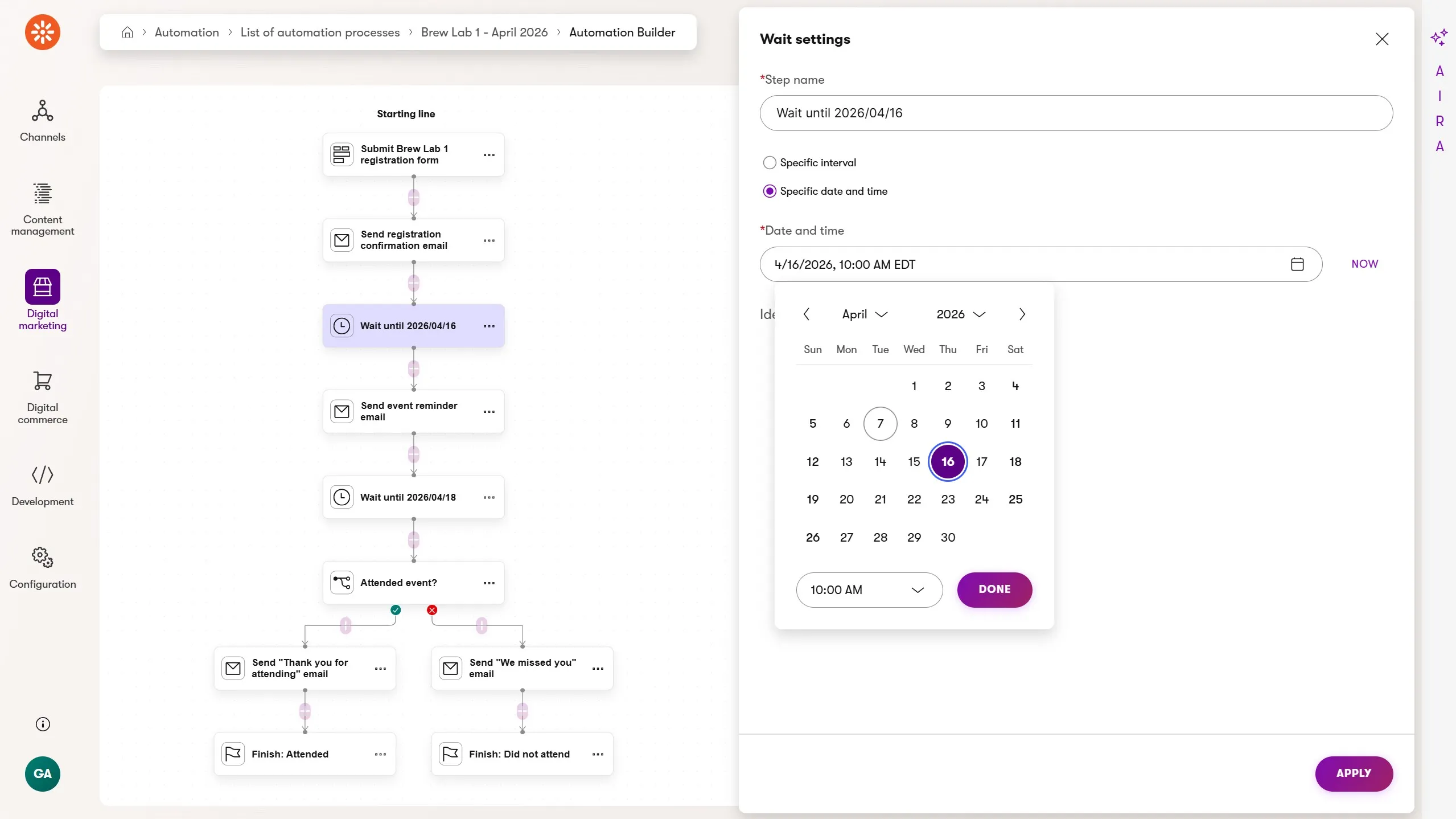
These are the automation steps:
- Form submission trigger: runs when the customer submits the Brew Lab RSVP form on Dancing Goat's events page
- Send email: immediate registration confirmation with event details, a "what to expect" link, and a cancellation contact
- Wait: until one day before the event date
- Send email: day-before reminder with time, location, parking, and what to bring
- Wait: until one day after the event date
- Condition: has the custom
dg_brewlab_attendedactivity been logged for this contact? - Send email (no-show): includes a "We missed you!" message and details about the next planned Brew Lab, link to the registration form
- Send email (attended): includes a "Thanks for coming!" message and a list of the equipment and coffees featured during the session, plus a 15% discount code on featured products
- Finish: named finish steps for both branches: "Attended" and "No-show"
The condition in step 6 is a binary check: did this contact attend or not? The dg_brewlab_attended activity is the signal that makes that check possible and bridges the digital → in-person → digital experience transitions..
Techniques for attendance tracking
When a customer registers on a laptop and scans a QR code at the event on their phone, those are two different devices and potentially two different browser sessions, which means two unmerged contact records. The approach you take to track attendance determines whether the automation condition fires correctly.
Here are three options, in order of increasing reliability:
Option 1: QR code landing page visit
This is simple but unreliable. A page visit on a mobile device can't be guaranteed to resolve to the same contact who registered on a different device. The automation condition would fire incorrectly or not at all for a meaningful percentage of attendees.
Option 2: QR code landing page form submission
This option is better. A form submission collects an email address, which Xperience uses to identify and merge contact records. The contact who registered and the contact who submitted the attendance form resolve to the same record.
But a form submission is a generic signal and doesn't carry business meaning. In six months, looking at a contact's activity history, you might see "submitted Brew Lab attendance form". Does this mean they planned to attend, RSVPed, or actually attended?
Option 3: Form submission triggering a custom activity
This is the right approach. The form submission handles identity resolution. The custom activity, logged by a lightweight second automation triggered by the form, carries the explicit business meaning.
dg_brewlab_attended unambiguously means "attended Brew Lab" in contact records, automation conditions, contact groups, and customer journeys.
It's also reusable: a future automation or personalization rule can condition on this activity without knowing anything about the form that produced it.
Taking this idea further, a headless channel might drive a tablet experience that staff use to register attendees. Headless activity tracking could then be used to log the custom activity directly. Both the form and tablet registration pathways lead to the engagement signal.
The attendance mini-automation
The custom dg_brewlab_attended activity was logged for attendees who visited a landing page linked from an 'entrance' QR code shown on displays at the event. This landing page includes a form that only collects an email address "to confirm attendance".
The entire setup process can be completed by marketers in Xperience by Kentico:
- Create the simple, email-only, attendance form.
- Create the landing page and add the form to the page using Xperience's Page Builder.
- Apply a vanity URL to the page - shorter URLs generate simpler QR codes.
- Author the page's content which describes the agenda for the event.
- Generate the QR code to show at the event.
- Create the
dg_brewlab_attendedcustom activity type in Contact Management. - Build the second automation to log an attendance activity.
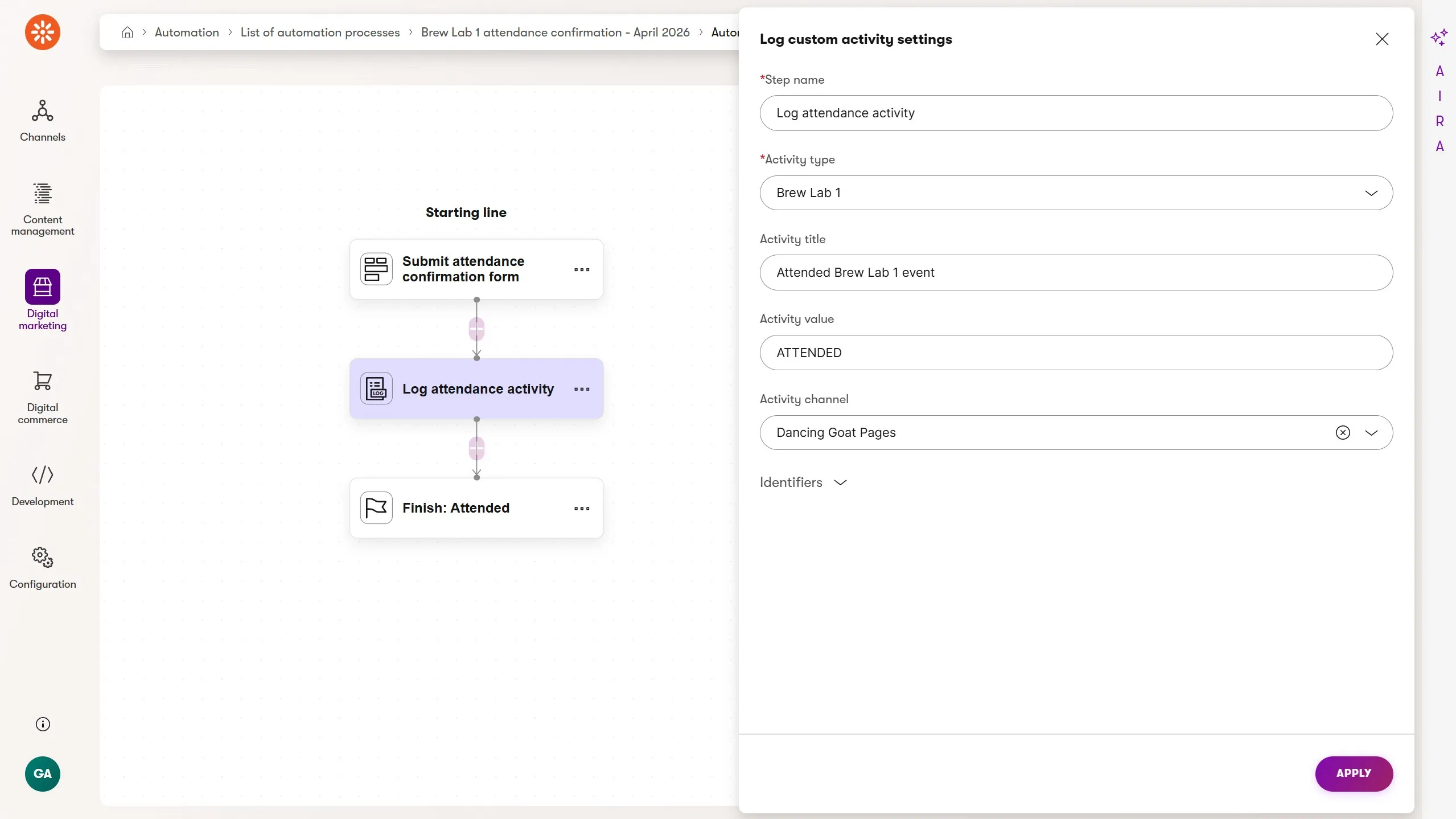
These are the automation steps:
- Form submission trigger: runs when the customer submits the Brew Lab attendance form on the QR code landing page
- Log custom activity: logs
dg_brewlab_attendedfor the contact - Finish: "Attendance logged"
That's it! The main event automation's condition checks for this activity one day after the event, and if it's there, the contact attended.
Extending the scenario
Looking beyond the core attendance-tracking approach, you can enhance the main automation by logging additional custom activities or updating contact field values. For example:
Track which specific Brew Lab a contact attended by using the activity value - e.g., dg_brewlab_attended with value "2026-05" for the May session. Future automations can condition on contacts who attended a specific session or during a specific month, enabling targeted follow-ups when a related product goes on sale.
Write the last attended date to a contact field using a Set contact field value step after the attended email: DG_BrewLabLastAttended = "May 2026". This field is then available for segmentation: a contact group "Lapsed Brew Lab attendees" could include anyone whose last attended date is more than six months ago, triggering a re-engagement campaign.
Chain to a loyalty automation by logging a second activity, dg_brewlab_converted, after the attended email. If Dancing Goat's GoatRewards program treats event attendance as a points-earning action, this activity becomes the signal the loyalty automation listens for. The patterns from Building a Loyalty Program Automation in Xperience by Kentico apply directly here.
This is also a great opportunity to call out Xperience's other features which enhance the value of our investments into these automations and customer experiences:
Campaigns help us manage our digital assets, clearly define the goal of the marketing investment, and evaluate the impact, helping us optimize future events.
The Content Strategist ensures our campaign content and calls to action match the brand's style, tone, and voice. This helps build and maintain trusted customer relationships.
Customer journeys track the conversion KPIs across each stage of the customer experience from initial form submission, to event attendance, and eventual discount code use.
What to build next
The attendance tracking pattern, using a form submission for identity resolution and a custom activity for business meaning, is the clearest illustration in this series of why custom activities exist.
It's worth carrying that thinking into the loyalty scenario, where the same division of responsibility scales to a more complex multi-automation workflow.
Loyalty tiers: Building a Loyalty Program Automation in Xperience by Kentico is the natural next step, building on the custom activity patterns introduced here
Content drip series: Chaining Automations in Xperience by Kentico: A Multi-Part Content Drip covers the multi-automation chaining pattern in depth if you want to understand how the mini-automation approach scales
Back to the full picture: Xperience Automations: You've Been Meaning to Explore Them. Here's What's Been Waiting

Sean Wright
I'm Lead Product Evangelist and part of the Developer Experience division at Kentico. I work to help our community understand the strategy and value of Xperience by Kentico, with a focus on developers building digital experience solutions. I'm also responsible for Kentico's Community Programs.