
Xperience Automations: You've Been Meaning to Explore Them. Here's What's Been Waiting
You know the feeling. You've seen a product feature, maybe even opened it once. You meant to come back to it. Other things came up.
That's not a lack of interest; it's a lack of a concrete starting point. Knowing a tool exists and knowing what to do with it are two different things, and the gap between them is often bridged with a few good examples.
This post shares five, all focused on Xperience by Kentico automations.
Each scenario is grounded in Dancing Goat, Kentico's example coffee brand, and built around a real marketing problem, the kind your team has probably already discussed. Some can be built entirely by a marketer. Others need a developer to unlock a key piece, but once that piece is in place, the marketer drives.
If you've been waiting for the right moment to start, this is it.
This post was written for Xperience by Kentico v31.3.0. Please consult the documentation for any feature or API changes when using a different version. Be sure to check the System Requirements in the product documentation.
Scenario 1: Newsletter Subscription Reminder
The Dancing Goat marketing team launched a newsletter for their coffee brewing and culture enthusiasts. The newsletter requires a double opt-in, which reduces spam and increases deliverability, but also means some of their audience will forget to confirm the sign-up.
Their primary website channel has a newsletter sign-up form in the footer. When a visitor submits the form, a form submission activity is automatically logged and a message displays reminding them to check their email to confirm their subscription. But once the visitor leaves the page, there's no follow-up - and conversions suffer for it.
Solution
This automation can be set up entirely by a marketer; no developer required.
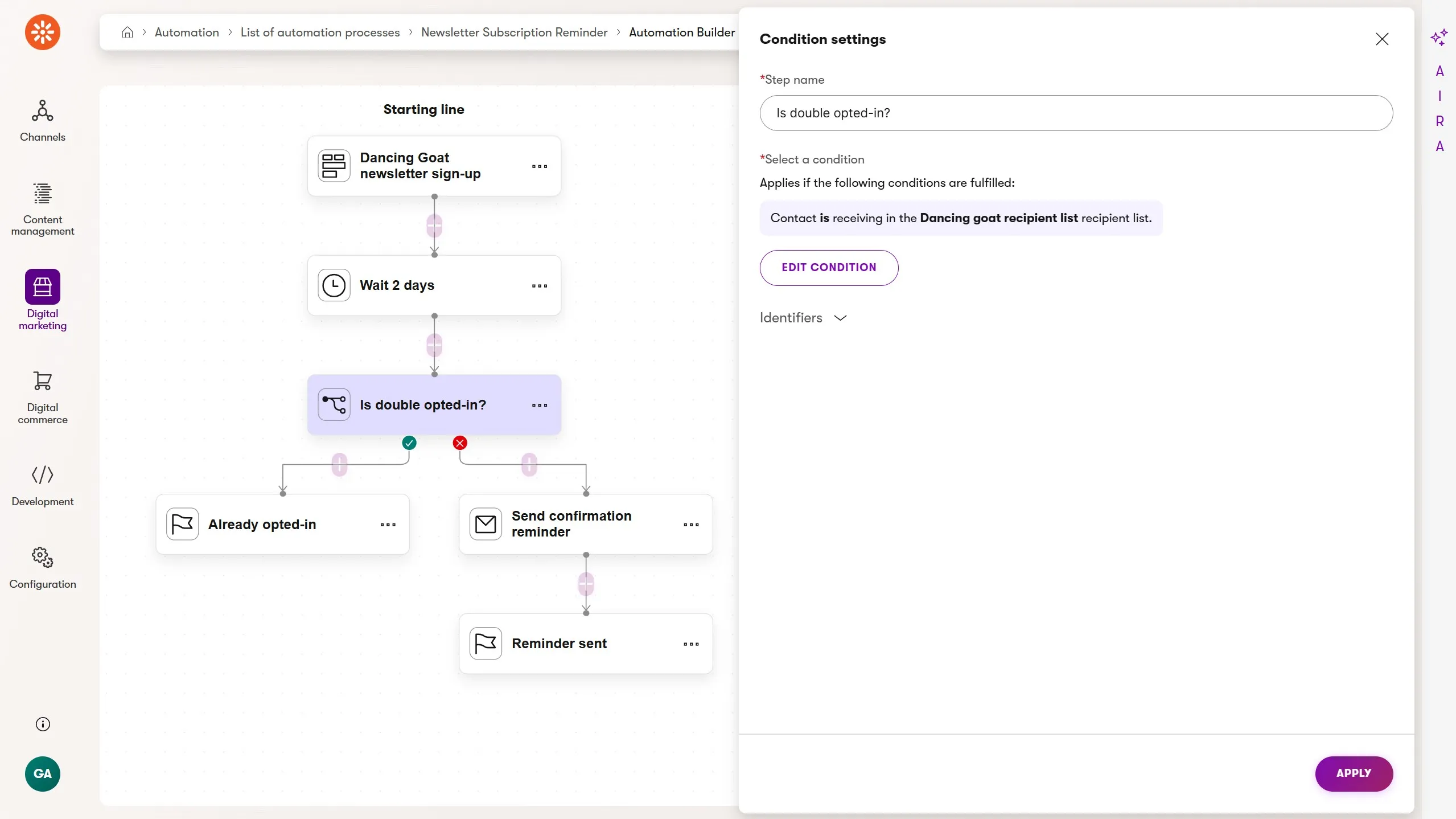
- Form submission trigger - The automation runs when a visitor submits the newsletter sign-up form.
- Wait - Two days gives the visitor time to confirm without waiting so long that they forget they signed up.
- Condition - Check if the contact is now in the newsletter recipient list, indicating they completed the double opt-in.
- Send email - If they still haven't confirmed, send a reminder email.
- Finish - Each branch has a dedicated finish step reflecting the expected outcome.
Personalized emails
Rather than re-sending the same confirmation email, a dedicated reminder lands better. Here's how the two differ:
Confirmation email (sent by the form autoresponder, not the automation)
Subject: One click to confirm your spot ☕
Brand intro, what they'll receive, prominent double opt-in CTA
Reminder email (sent by the automation)
Subject: Still want brew tips in your inbox?
Warmer and shorter. Acknowledges they signed up, reassures them it's easy to leave, re-presents the confirmation CTA.
Want to go deeper on this scenario? From Built to Optimized: Getting More from Your First Xperience Automation covers automation design best practices, how to use AIRA to write stronger emails, and how to connect this automation to Customer Journeys and Campaigns for ongoing measurement.
Scenario 2: Post-Purchase Brewing Guide Sequence
A customer just bought a Chemex 6-Cup Brewer from the Dancing Goat online store. They're excited but haven't brewed with a Chemex before. Their order confirmation email arrives, but then silence. Three days later they're Googling "chemex ratio" because Dancing Goat never followed up.
Great customer experiences are a competitive edge. Being ready with the right help at the right moment moves the needle.
Solution
A marketer can build this automation end-to-end with a few Xperience by Kentico features, plus a small amount of one-time setup from a developer.
The automation is triggered when a customer submits a Brewer Registration form on the order confirmation page. That form captures which brewer product they purchased and maps it to a custom Brewer model field on their contact record.
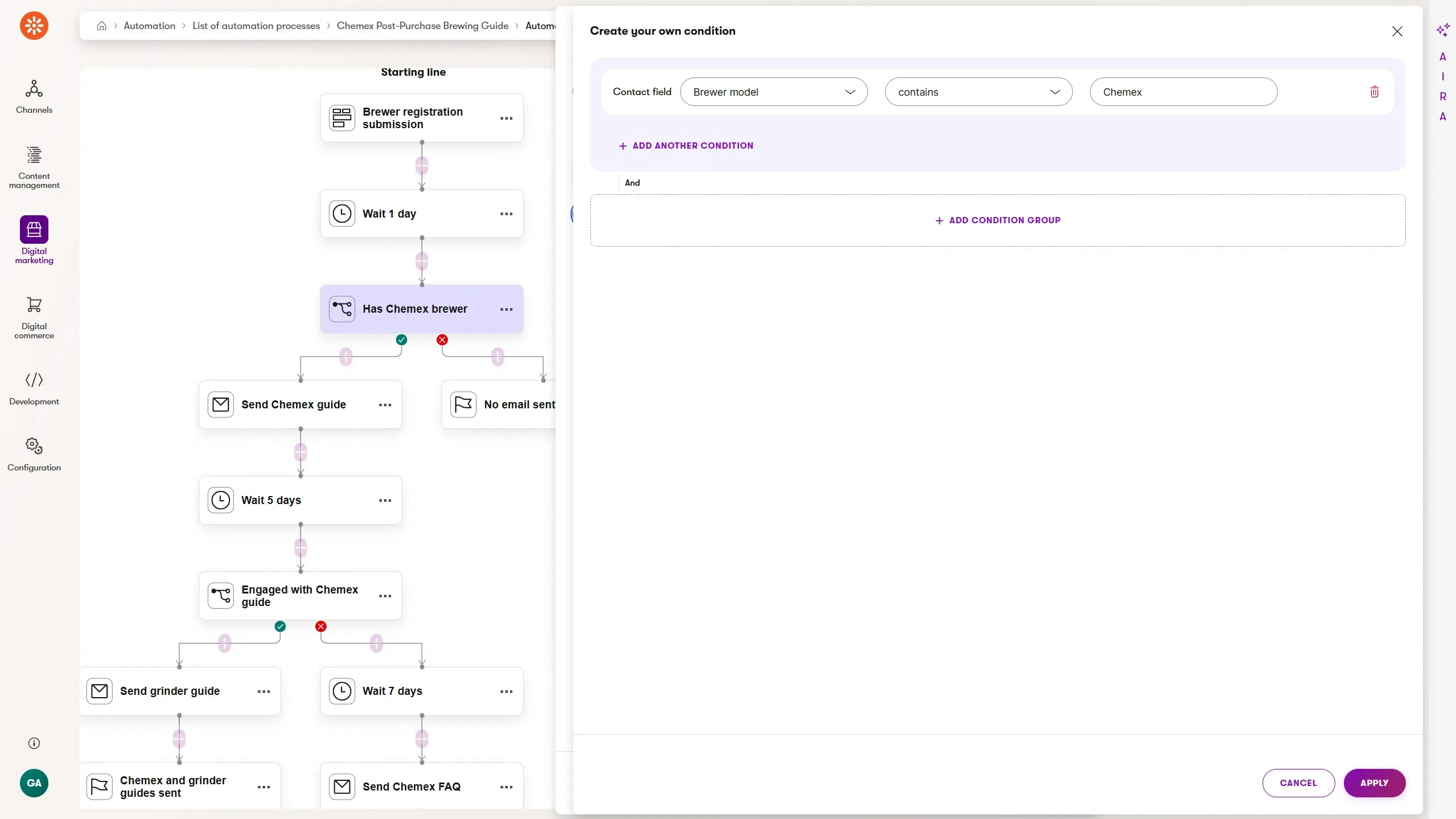
- Form submission trigger - the automation runs when the customer submits the Brewer Registration form.
- Wait - one day, so this email doesn't compete with transactional order emails.
- Condition - check if the Brewer model contact field contains "Chemex".
- Send email - the Chemex brew guide: grind size, water temperature, bloom technique, link to the full guide article.
- Wait - five days to see if they engaged with the guide.
- Condition - did they click a link in the guide email?
- Send email - if yes, a grinder recommendation email. If no, a Chemex FAQ - a softer follow-up for customers who might be struggling quietly.
- Finish - each branch ends with a dedicated finish step.
This automation focuses on Chemex buyers. The same pattern applies to any brewer in the range - each gets its own branch, triggered by the same form, conditioned on the same contact field.
Want to build this yourself? Building a Post-Purchase Brewing Guide in Xperience by Kentico walks through the contact field setup, form configuration, and how to scale this across multiple products.
Scenario 3: Engagement-Gated Content Drip
The Dancing Goat marketing team wants to deepen their customers' connection to the coffee experience. They've published a Coffee Origins article series - five long-form pieces covering Ethiopia, Colombia, Guatemala, Sumatra, and Kenya. Visitors can sign up to receive the series early, one story a week.
But interest at sign-up doesn't guarantee engagement later. Life gets busy. An article gets missed.
Rather than blindly sending all five emails on a fixed schedule regardless of whether anyone is reading, the automation checks whether the subscriber engaged with the previous article before sending the next one. If they didn't, it sends a gentle nudge instead of piling on content they're ignoring.
This improves deliverability, respects the reader, and builds the kind of trust that makes future campaigns more effective.
Solution
This is where automations in Xperience start to show their real range. The Coffee Origins drip isn't a single automation; it's several automations chained together using custom activities.
Each article in the Coffee Origins series gets its own automation, triggered by a custom activity logged at the end of the previous one.
When a subscriber engages, the next automation fires. When they don't, a nudge goes out - and if they engage with that, the same custom activity triggers the next step. If not, the chain stops.
The result is a content sequence that behaves like a conversation rather than a blast of content. Contacts move through it at their own pace, and the automation responds to what they actually do.
This pattern also introduces a reusable technique: a custom Page Builder widget that lets marketers log custom activities from any page - without touching code after the initial build.
The widget is what connects a subscriber confirming their sign-up on a recipient list confirmation page to the first automation in the chain, and it can be repurposed for any scenario where a page visit or interaction needs to trigger automation logic.
Want to build this yourself? Chaining Automations in Xperience by Kentico: A Multi-Part Content Drip covers the full setup - registration automation, confirmation page widget, chaining pattern, and the widget source code.
Scenario 4: Event Registration and Attendance Follow-Up
The Dancing Goat marketing team plans an ongoing series of Brew Lab events - in-person workshops at their cafe where coffee enthusiasts can learn brewing techniques and try products before they buy.
- Registrants should feel prepared before they arrive.
- Attendees should feel rewarded.
- No-shows should experience some FOMO and learn about the next event.
How do you segment between attendees and no-shows when attendance happens in the physical world?
Solution
Most of this automation will feel familiar by now: a form trigger, pre-event emails with a date-based wait, and a post-event condition branch. What makes this scenario interesting is how it bridges the physical event back into Xperience.
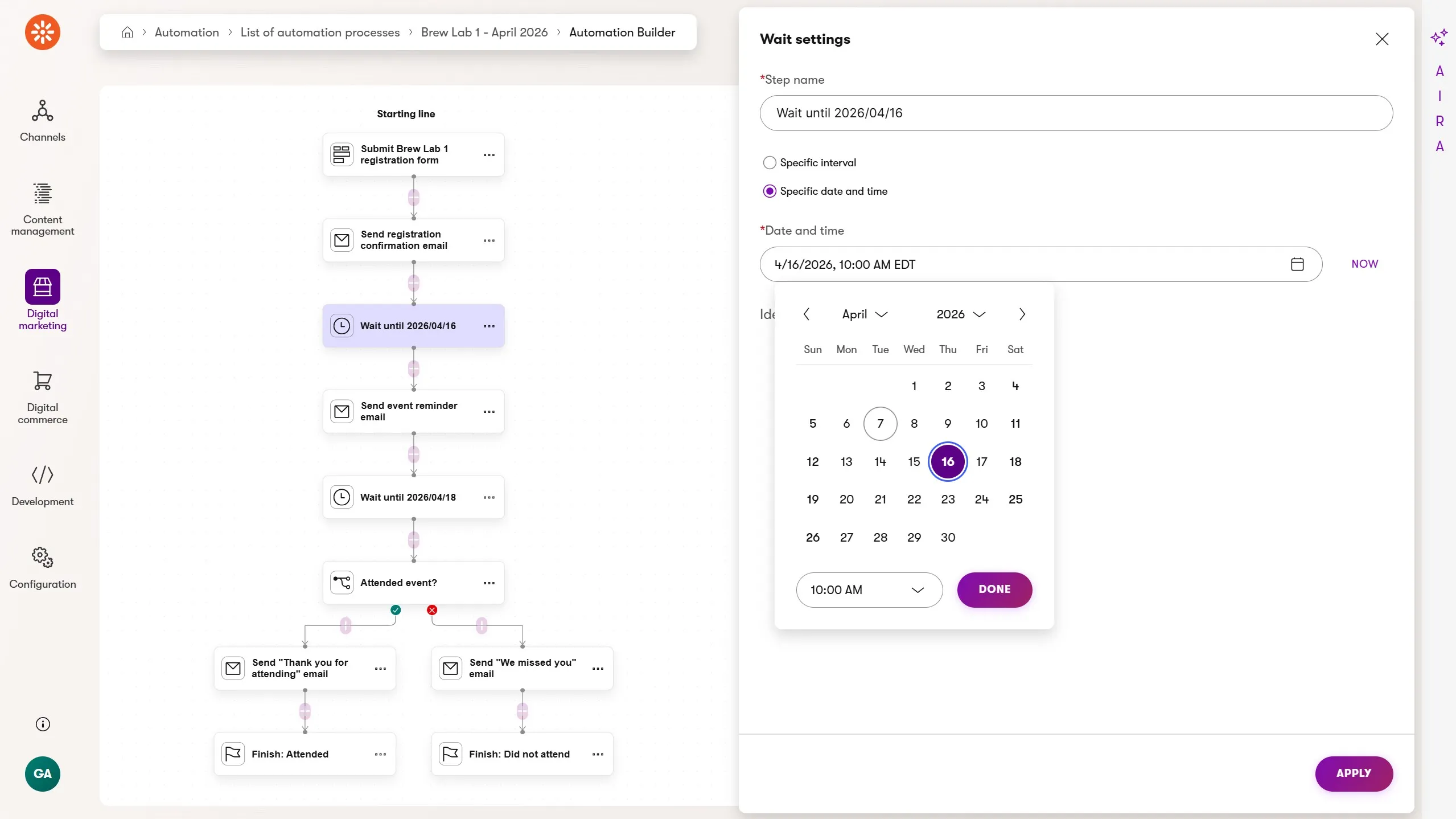
- Form submission trigger - the automation runs when the customer submits the Brew Lab RSVP form.
- Send email - an immediate registration confirmation with event details and a cancellation contact.
- Wait - until one day before the event.
- Send email - a reminder with time, location, parking, and what to expect.
- Wait - until one day after the event.
- Condition - check if a custom "Brew Lab attended" activity was logged for the contact.
- Send email - attendees get a thank-you with a 15% discount on featured products. No-shows get details about the next event and a link to register.
- Finish - each branch ends with a dedicated finish step.
Attendance is tracked through a QR code displayed at the event. Scanning it takes attendees to a landing page with a short form - and that form submission triggers a second lightweight automation that logs the custom activity.
No developer required; a marketer can build the page, apply a vanity URL for a cleaner QR code, and wire up the automation independently.
A page visit alone can't reliably link a mobile device scan back to the contact who registered on a different device. A form submission gets the required data into Xperience.
The custom activity is the key signal that makes the business meaning explicit: this contact attended. That signal is available across Xperience: automations, contact groups, customer journeys, personalization.
Want to build this yourself? How to Automate Event Registration and Attendance Follow-Up in Xperience by Kentico covers the full setup - the RSVP form, date-based waits, the QR attendance flow, and when and why to use a custom activity over simpler tracking options.
Scenario 5: Loyalty Tier Upgrade Path
Dancing Goat runs a GoatRewards loyalty program. Members earn points on every purchase - 500 points unlocks Roaster tier, 1500 unlocks Master Roaster. Each tier brings better perks: early access to limited roasts, free shipping, and invitations to exclusive events.
The marketing team wants every stage of that journey to feel intentional - not just the moment a tier is reached, but the moments leading up to it. And they want it to happen automatically, without anyone watching a spreadsheet.
Solution
This is the most developer-assisted scenario in this series, and deliberately so.
Knowing how many points a contact has, when a threshold is approaching, and when it's been crossed live in the order completion code where numeric logic belongs.
The developer provides a set of custom activity hooks, each representing a meaningful moment in the loyalty journey.
The marketer builds five automations that respond to them.
The developer responsibility
The developer custom activity hooks:
First purchase:
dg_first_purchasewelcomes the contact to GoatRewardsApproaching Roaster:
dg_approaching_roasterfires when cumulative points cross 400Roaster achieved:
dg_tier_roaster_reachedfires at 500 pointsApproaching Master Roaster:
dg_approaching_master_roasterfires at 900 pointsMaster Roaster achieved:
dg_tier_master_roaster_reachedfires at 1500 points
The developer is also responsible for edge cases the automation shouldn't reason about. A customer who buys five expensive grinders as their first order might technically qualify for multiple tier events simultaneously - the developer ensures only the most meaningful activity is logged, jumping that contact directly to the appropriate tier rather than firing every automation in sequence.
The marketer responsibility
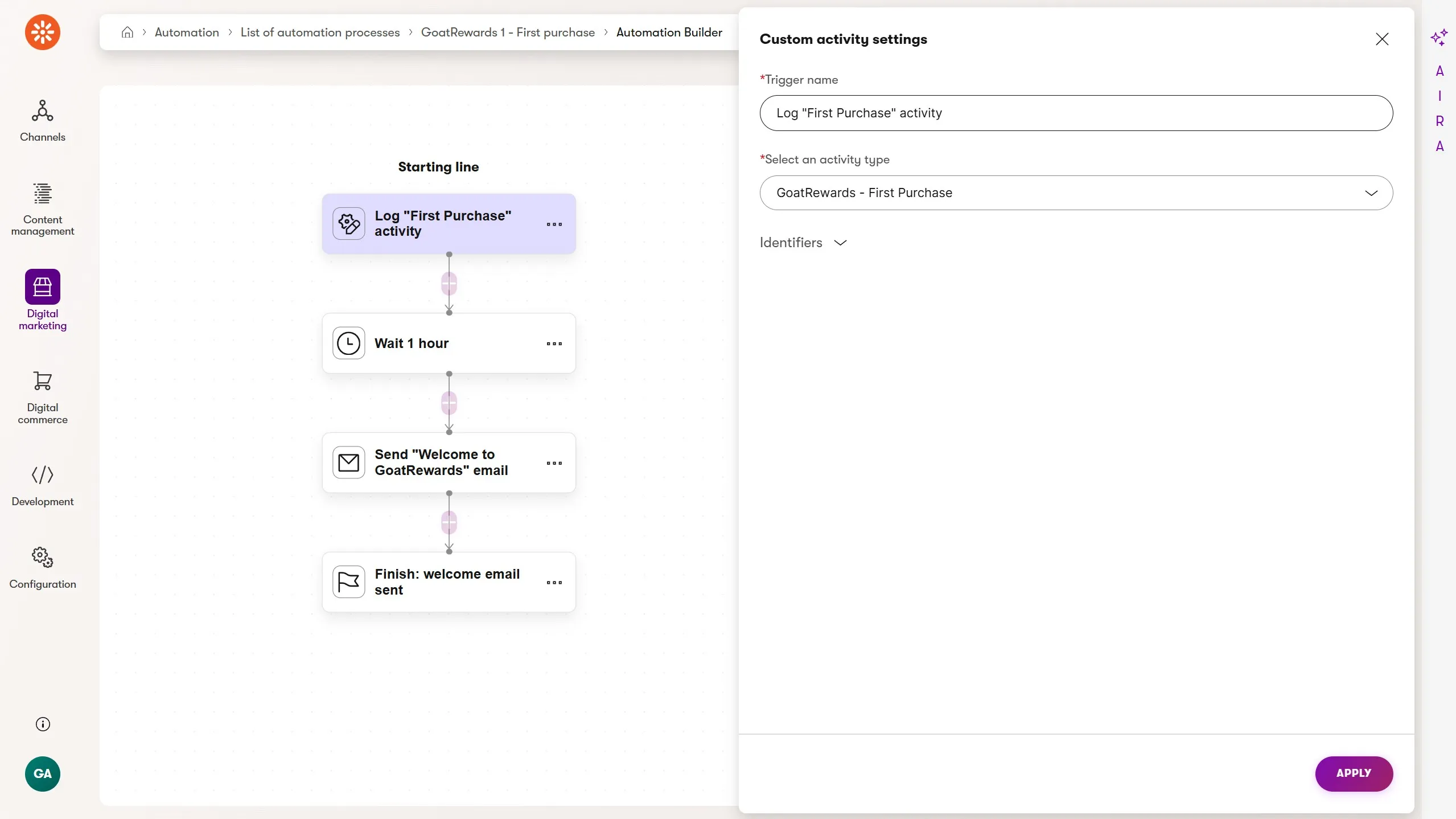
The marketer's five automations, each of which have their own steps and configuration:
- First purchase - welcome to GoatRewards, here's how points work, here's what Roaster tier looks like when you get there
- Approaching Roaster - you're close. Product recommendations paired with a small discount to encourage the next purchase
- Roaster achieved - congratulations, here's your discount, here's your early invite to the next Brew Lab event. A
Set contact field valuestep writesGoatRewards tier = Roasterto the contact record - Approaching Master Roaster - a lighter touch promo nudge calibrated for a customer who already knows and trusts the brand
- Master Roaster achieved - congratulations, here's your discount, and a form CTA to claim a Dancing Goat latte cup - which can itself trigger a fulfilment confirmation automation
Each tier-achievement automation writes the confirmed tier to the contact record, not just for record-keeping but as a live segment available across channels in Xperience: personalized page content, dedicated email campaigns, customer journey stages.
The automation formalizes the activity and because Xperience by Kentico consolidates channels and contact data in a single product, the event is available across the platform.
What else is possible?
The "approaching tier" automations are worth pausing on. They don't respond to something that went wrong. They anticipate. That's a different kind of automation thinking, and one of the most valuable things a loyalty program can do.
The program's thresholds and reward events can even be managed by marketers directly - no code changes required - with a small amount of upfront developer investment.
And looking ahead: the Xperience by Kentico roadmap has two significant enhancements arriving soon.
- Customer Data Platform - Identity resolution and Audience Segmentation
- Customer Data Platform - Online marketing enablement
Every automation you build and the creativity muscle you strengthen today will put you in a great position to leverage these features when they land in the product.
Want to build this yourself? Building a Loyalty Program Automation in Xperience by Kentico covers the developer setup, edge case handling, and the full configuration for all five automations.
Where do you go from here?
Five scenarios. Five practical starting points. Whether you build the simplest one this week or hand the loyalty program scenario to your developer as the brief for next sprint, you now realize the value that's been waiting in Xperience by Kentico's automations.
The detail articles below go deeper on each scenario - setup, configuration, and everything you need to build. Pick the one that best fits your current goals.
From Built to Optimized: Getting More from Your First Xperience Automation
Building a Loyalty Program Automation in Xperience by Kentico
We'll publish these additional automation articles over the next few weeks. Want to make sure you don't miss them? Subscribe to the Kentico Community Portal newsletter!

Sean Wright
I'm Lead Product Evangelist and part of the Developer Experience division at Kentico. I work to help our community understand the strategy and value of Xperience by Kentico, with a focus on developers building digital experience solutions. I'm also responsible for Kentico's Community Programs.